Solve all ten cases in Database Detective: Minor Crimes Division with the clues and SQL queries that lead to each culprit.
Database Detective: Walkthrough Guide

Introduction
- Read the in-game manual first. The steps below expect you to know its keywords and commands.
- Names and results change with every playthrough. The screenshots and some values below come from one run, so yours may differ.
- The game runs a real SQL engine that accepts any SQL keyword or command. These solutions stick to what the manual teaches, so they stay easy to follow if you don’t know SQL.
Case 1: Welcome Recruit!
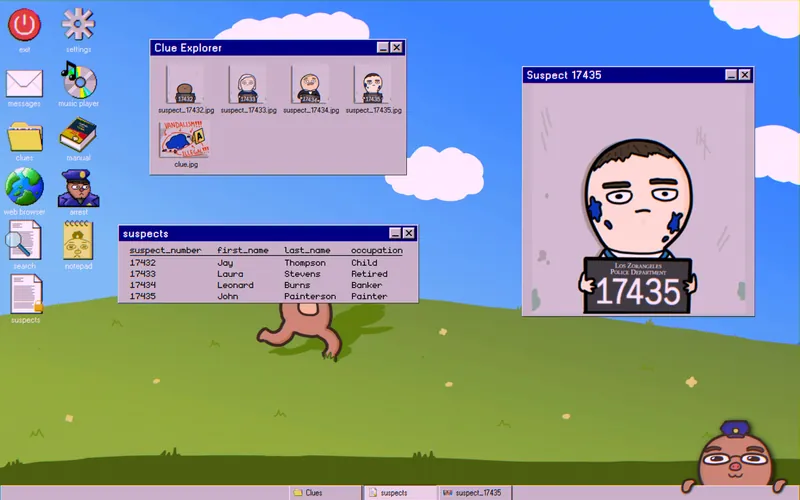
This case teaches the basic mechanics and detective work.
- Open the clues folder to see photos of the possible suspects.
- Find the suspect with blue paint on his face.
- Open the suspects table and match the
suspect_numberto his mugshot.
Achievement: one entry in the suspects table has the occupation “Child.” Arrest that person to unlock Minor Crimes.
Case 2: Catching a Litterbug
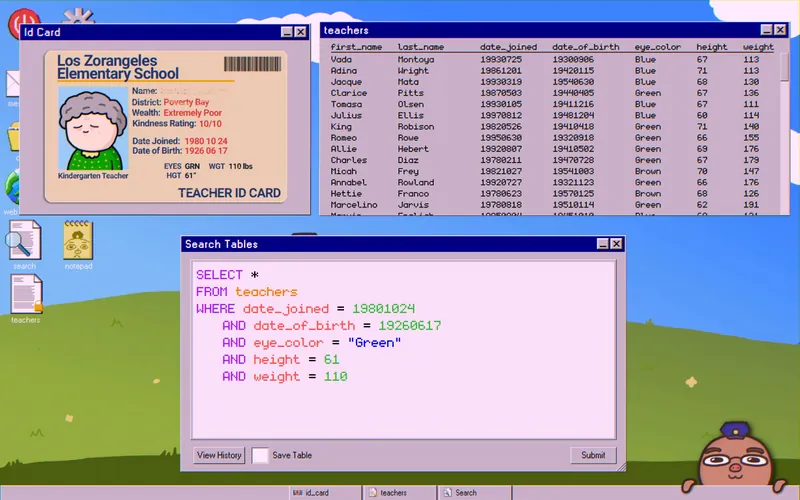
One of the clue photos is an id_card with the culprit’s details. Filter the teachers table with them:
SELECT *
FROM teachers
WHERE date_joined = 19801024
   AND date_of_birth = 19260617
   AND eye_color = "Green"
   AND height = 61
   AND weight = 110
The query should return a single name.
Case 3: Top Secret Message
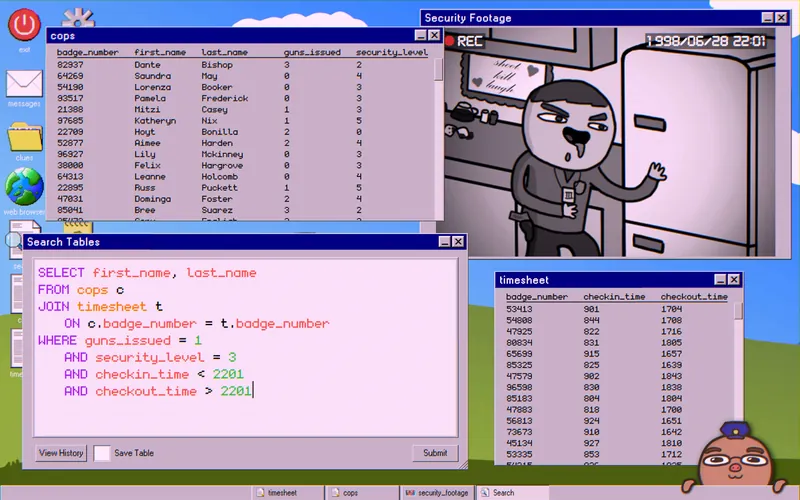
Here you track down a sandwich thief. Check the security_footage photo in the clues folder, then open the cops and timesheet tables. The photo shows three details:
- The suspect carries one gun.
- Their badge shows “III”.
- The photo is timestamped 22:01.
Join the two tables and filter by those details:
SELECT first_name, last_name
FROM cops c
JOIN timesheet t
ON c.badge_number = t.badge_number
WHERE guns_issued = 1
AND security_level = 3
AND checkin_time < 2201
AND checkout_time > 2201
Only one name should come back.
Case 4: A Landlord Needs Us!
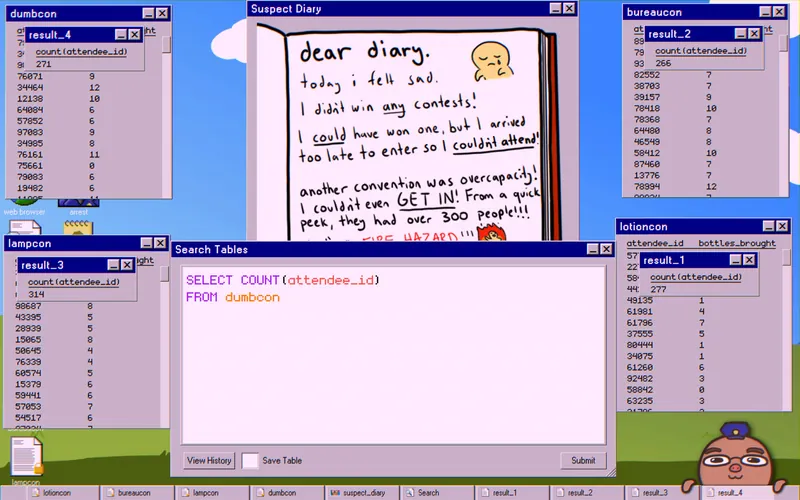
You need to find a tenant who has overstayed. Go through the clue photos first. In the suspect_diary photo, the suspect says one contest was over capacity (300), so they couldn’t get in.
Count the attendees of each convention with this query:
SELECT COUNT(attendee_id)
FROM lotioncon
Run it again with bureaucon, lampcon, and dumbcon in place of lotioncon. Rule out the convention that went over capacity.
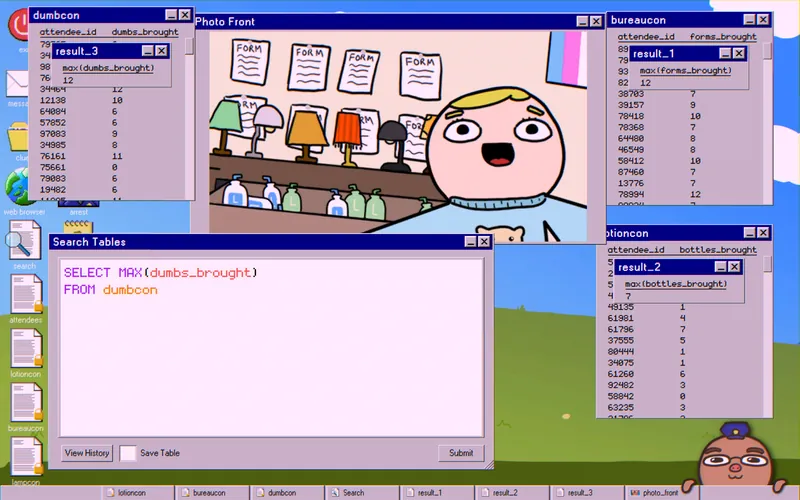
The suspect also says they would have won one contest but arrived late and couldn’t enter. Find the highest number of items brought at each convention, then compare those numbers with the photo_front clue to see which contest they would have won.
SELECT MAX(bottles_brought)
FROM lotioncon
Swap bottles_brought and lotioncon for the matching column and table each time. Rule out the convention they would have won.
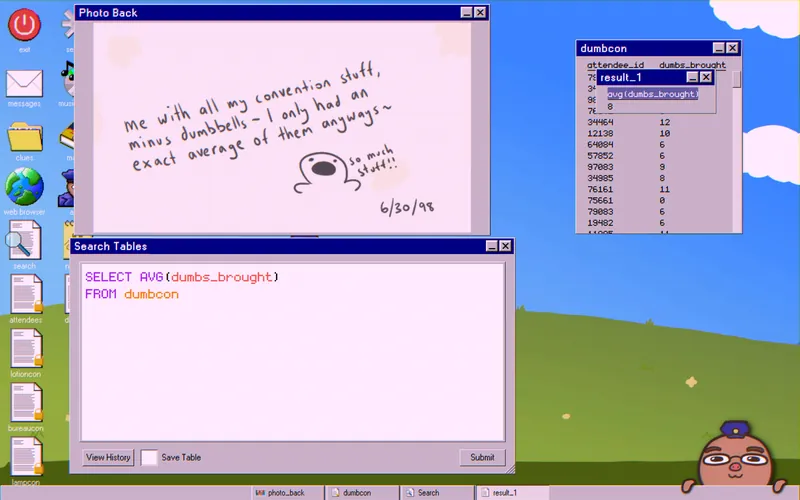
The photo_back clue says they brought exactly the average number of dumbbells. Calculate it:
SELECT AVG(dumbs_brought)
FROM dumbcon
In the example run, the answer was 8.
Now use the two convention tables that are left, plus the numbers from the photo clues, to find the culprit:
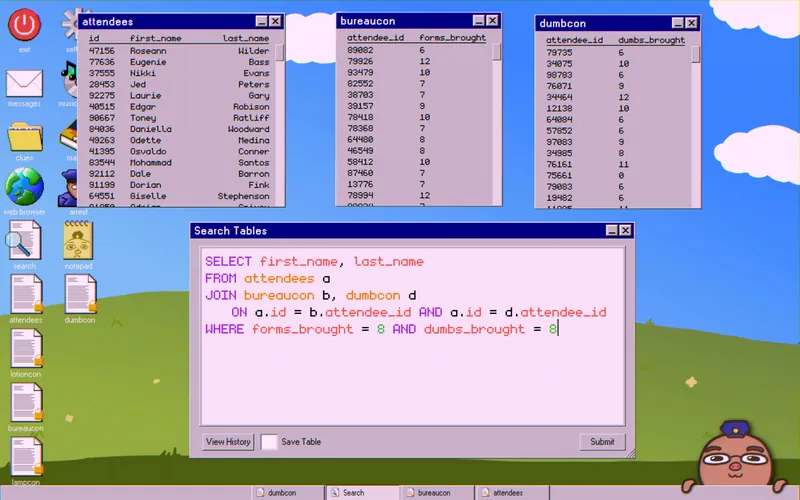
SELECT first_name, last_name
FROM attendees a
JOIN bureaucon b, dumbcon d
ON a.id = b.attendee_id AND a.id = d.attendee_id
WHERE forms_brought = 8 AND dumbs_brought = 8
The result should be a single name.
Case 5: War Criminal on the Loose

Someone has committed the crime of putting pineapple on pizza. There are three main clues:
- The suspect leaves the lowest percentage tip every time he pays.
- A business card points to the shop’s site, pizzaslices.net.
- The last photo clue shows pepperoni pizza.
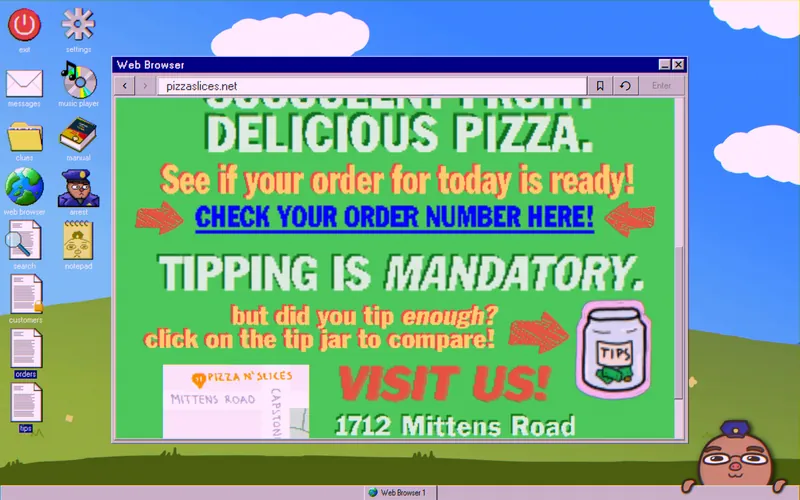
Visit pizzaslices.net and download the orders and tips tables. Each order_number can contain several items.
Pull out the orders that include both “pineapple” and “pepperoni pizza.” This query uses OR, which the manual only introduces in Chapter 7.
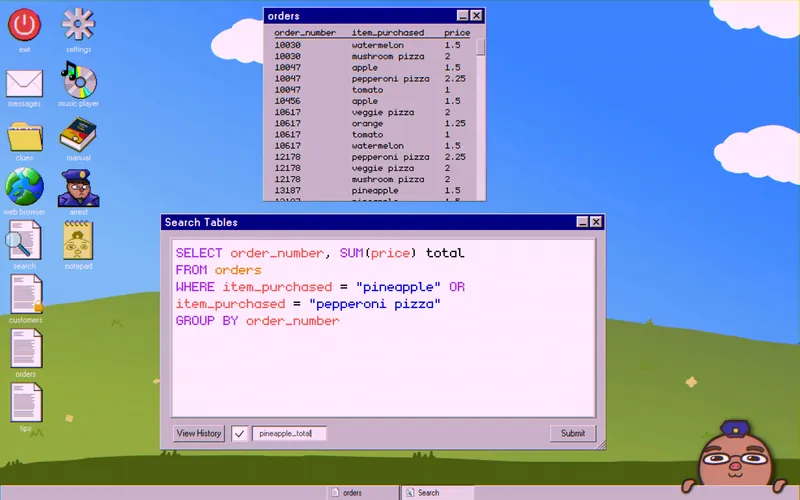
SELECT order_number, SUM(price) total
FROM orders
WHERE item_purchased = "pineapple" OR item_purchased = "pepperoni pizza"
GROUP BY order_number
Save the result as pineapple_total.
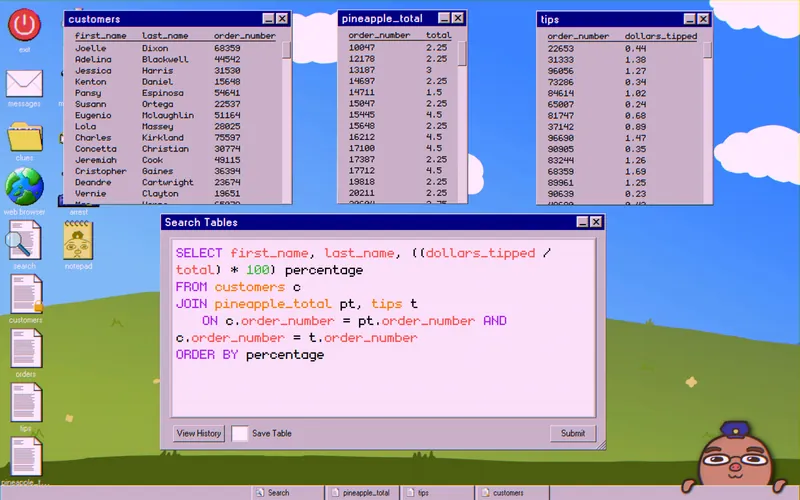
Join your new table with tips and customers:
SELECT first_name, last_name, ((dollars_tipped / total) * 100) percentage
FROM customers c
JOIN pineapple_total pt, tips t
ON c.order_number = pt.order_number AND c.order_number = t.order_number
ORDER BY percentage
The first name in the list is the lowest percentage tipper. To be sure, check the orders table and confirm they ordered both “pineapple” and “pepperoni pizza.”
Case 6: Our Country Needs You
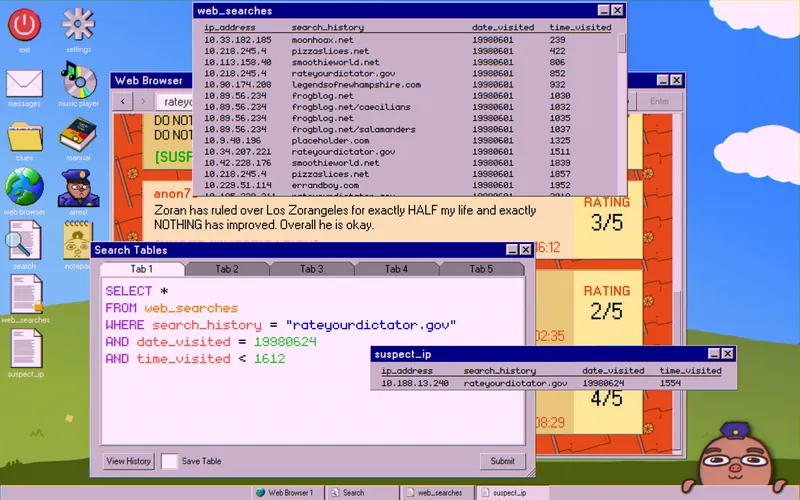
Your task is to find a libelist, at least in the eyes of Calizorania. You get the login details for rateyourdictator.gov/admin. Log in and open the moderated comments.
Scroll down to the comment marked “UNDER INVESTIGATION.” Use the given clues to find the suspect’s IP address:
SELECT *
FROM web_searches
WHERE search_history = "rateyourdictator.gov"
   AND date_visited = 19980624
   AND time_visited < 1612
Save the result as suspect_ip.
Achievement: leave a review at the bottom of rateyourdictator.gov to unlock That Was a Positive Review, Right?
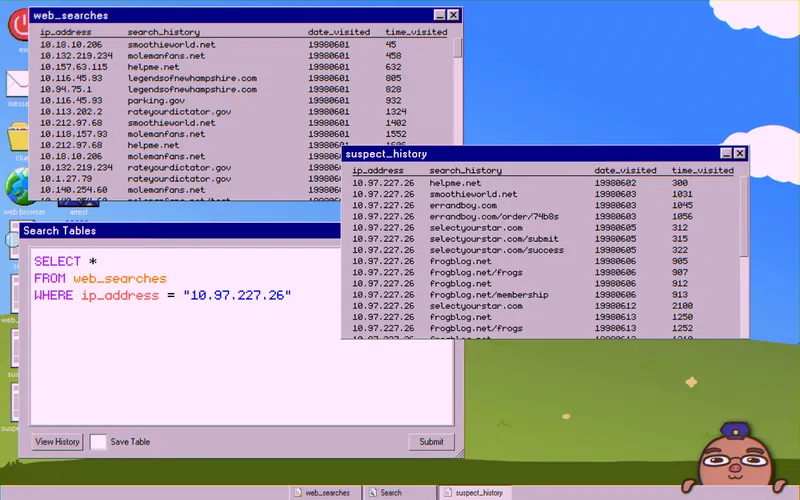
Next, list the suspect’s search_history using their IP address:
SELECT *
FROM web_searches
WHERE ip_address = "10.97.227.26"
Save it as suspect_history. Now visit the websites one by one to learn about the suspect.
Clues Without Queries
You can find these in any order:
- The suspect’s MMDB username is “ribbit78.” The comment was posted as “anon78,” which supports the link.
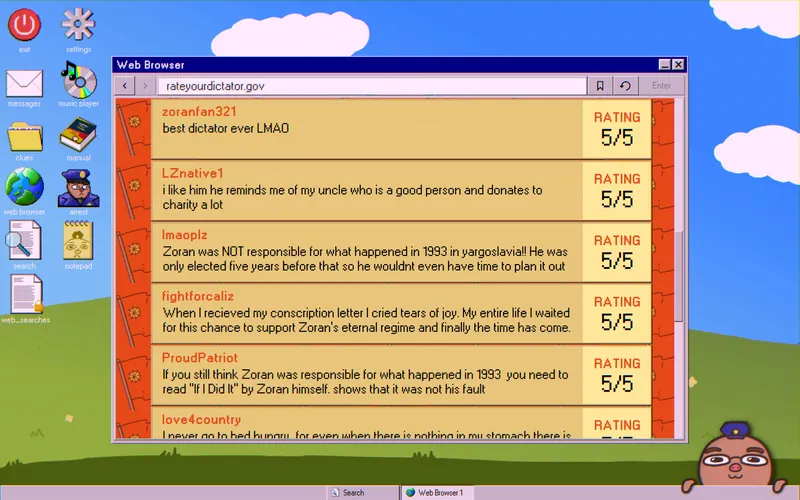
- Their message says Zoran has ruled for half their life. A comment on the rateyourdictator.gov front page suggests Zoran has been in power for 10 years, so the suspect is 20.
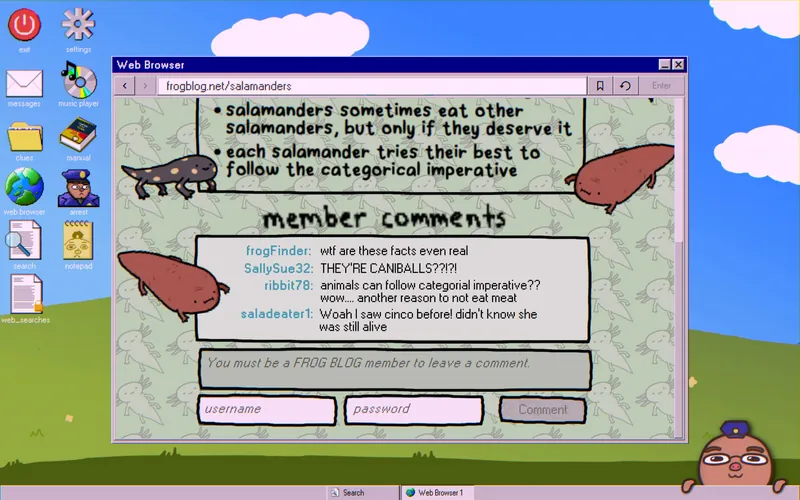
- The comments on frogblog.net strongly suggest the suspect is vegetarian.
Achievement: apply for membership on frogblog.net to unlock Frog Fan.
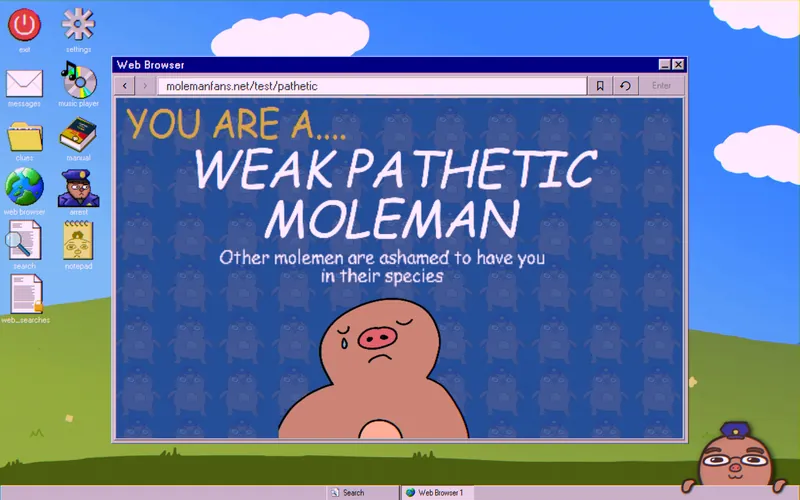
- The molemanfans.net/test/pathetic page shows they are allergic to peanuts. If you take the test yourself, you only get the same result by being allergic to peanuts (and not respecting the police).

- jimsbirthday.net lists everyone’s favorite food, so the suspect’s is on this page. Based on the options, it has to be “Falafels,” “Hummus,” or “Carrots.”
Clues That Need Queries
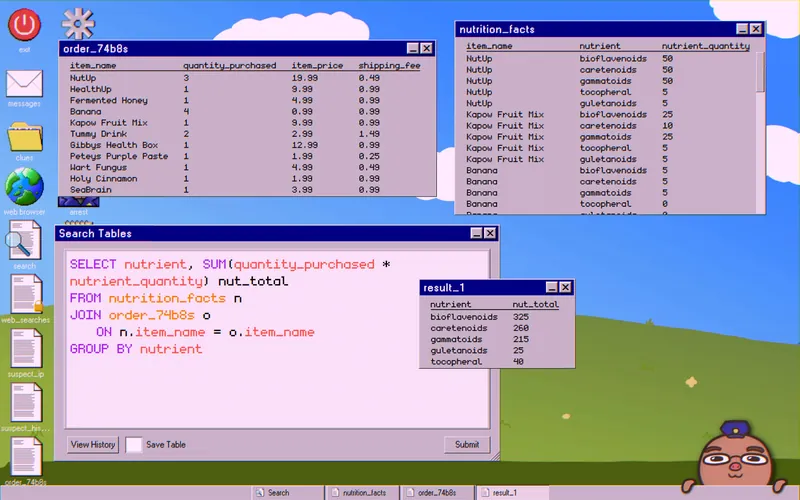
The suspect placed an order through errandboy.com/order/74b8s. Download it. On smoothieworld.net, download the nutrition_facts table at the bottom of the page. The ingredients match one of four desires.
Join the tables and add up each nutrient type:
SELECT nutrient, SUM(quantity_purchased * nutrient_quantity) nut_total
FROM order_74b8s o
JOIN nutrition_facts n
   ON o.item_name = n.item_name
GROUP BY nutrient
Compare the totals with the smoothie ingredient totals to find which trait the suspect wants.
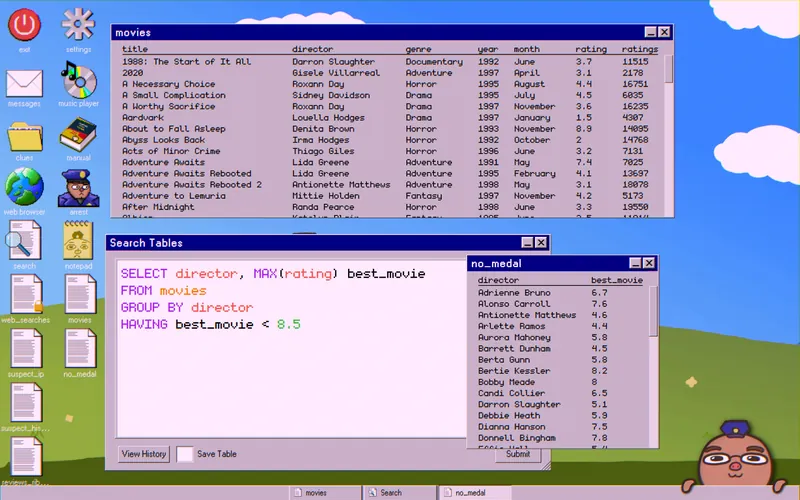
On their MMDB profile, the suspect says their favorite movie, rated “10,” was made by a director who hasn’t won a Megacorp Medal. Download their reviews_ribbit78 table and the movies table from the MMDB front page.
First, list the directors without a Megacorp Medal:
SELECT director, MAX(rating) best_movie
FROM movies
GROUP BY director
HAVING best_movie < 8.5
Save it as no_medal.
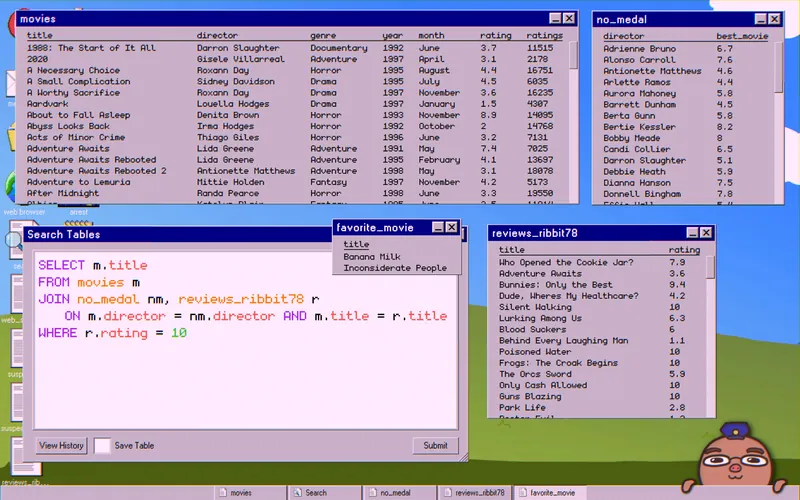
Then join no_medal with reviews_ribbit78 and movies to find their favorite movie:
SELECT m.title
FROM movies m
JOIN no_medal nm, reviews_ribbit78 r
   ON m.director = nm.director AND m.title = r.title
WHERE r.rating = 10
Save it as favorite_movie.
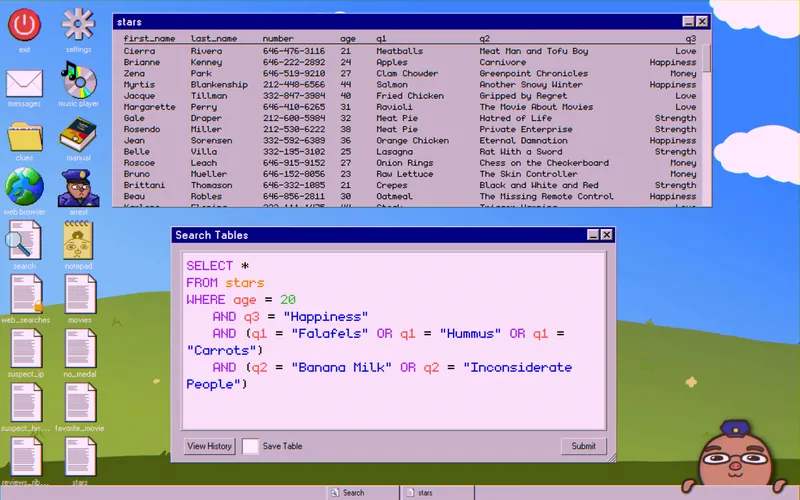
Last, the selectyourstar.com/success page shows the suspect signed up for the dating site. The front page has a stars table with everyone who signed up. Its columns are age, q1, q2, and q3. According to selectyourstar.com, each question matches a clue from suspect_history.
Achievement: two people are featured on the selectyourstar.com front page. Arrest one of them to unlock Heartbreaker.
Put all the clues into one query:
SELECT *
FROM stars
WHERE age = 20
   AND q3 = "Happiness"
   AND (q1 = "Falafels" OR q1 = "Hummus" OR q1 = "Carrots")
   AND (q2 = "Banana Milk" OR q2 = "Inconsiderate People")
You should get one name.
Case 7: A Murder!!!!
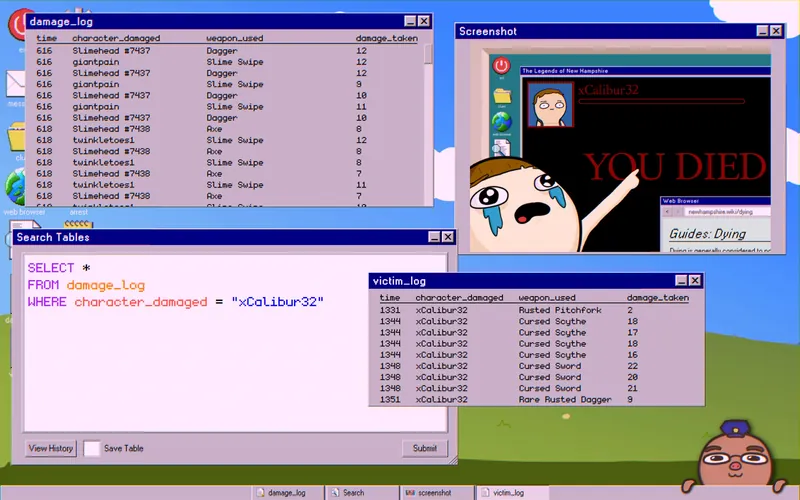
You’re hunting a virtual murderer. Your supervisor’s kid complains that someone killed him in his favorite online game, The Legends of New Hampshire. The screenshot clue shows the newhampshire.wiki/dying page and the kid’s username, “xCalibur32.”
Start by searching the damage log for his username:
SELECT *
FROM damage_log
WHERE character_damaged = "xCalibur32"
Save it as victim_log. The times suggest xCalibur32 was killed at 1351. The killing blow came from a “Rare Rusted Dagger” that dealt 9 damage.
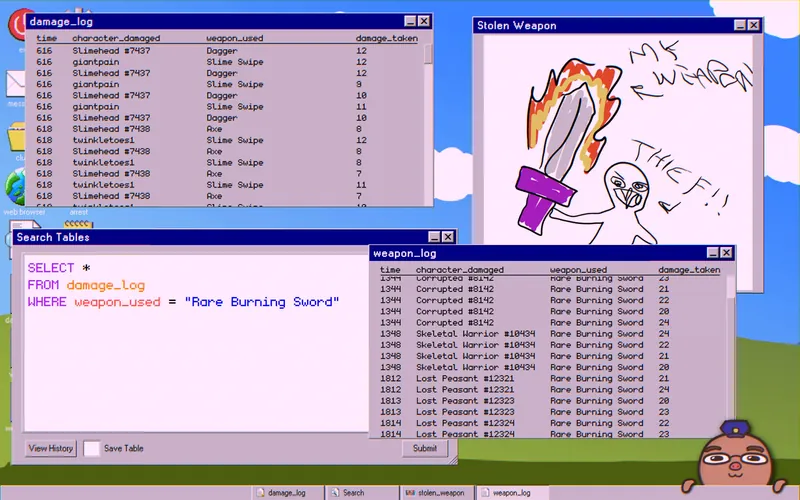
Now check the stolen weapon clue. To identify the weapon, open newhampshire.wiki and read the Weapons article from the main menu. Its “Effects” and “Qualities” sections show that xCalibur32’s weapon is a “Rare Burning Sword.”
Search the damage log for it:
SELECT *
FROM damage_log
WHERE weapon_used = "Rare Burning Sword"
Save it as weapon_log. The sword was in use during xCalibur32’s playtime. It was also used from 1812 to 1814, after he was likely dead.
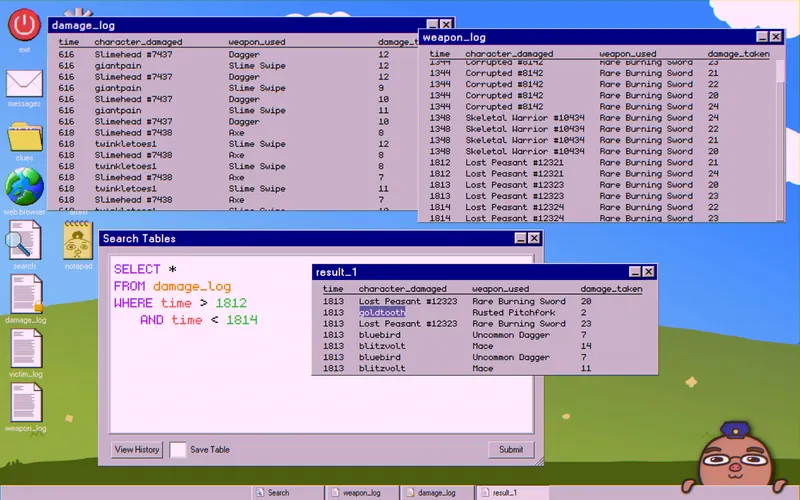
Search the damage log for that time window:
SELECT *
FROM damage_log
WHERE time > 1812
AND time < 1814
The results show a few characters damaged in this window. Between the Rare Burning Sword hits sits a character named “goldtooth.”
The “Lost Peasant,” “Corrupted,” and “Skeletal Warrior” characters appear in the wiki’s Enemies article. Match them to weapon_used, and the Locations article tells you roughly where the player was.
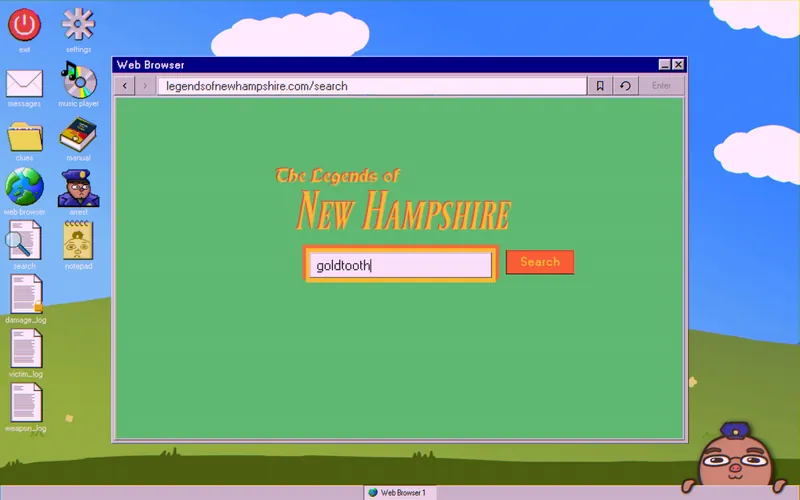
Follow the trail. Open the How to Trade article and click the legendsofnewhampshire.com/search link. Search for “goldtooth.” Each player profile lists a class, a bio, and any shared links.
goldtooth shares a PayUp account. In its transaction history, a note shows they paid “sefrgswrg” for a “rare burning sword.”
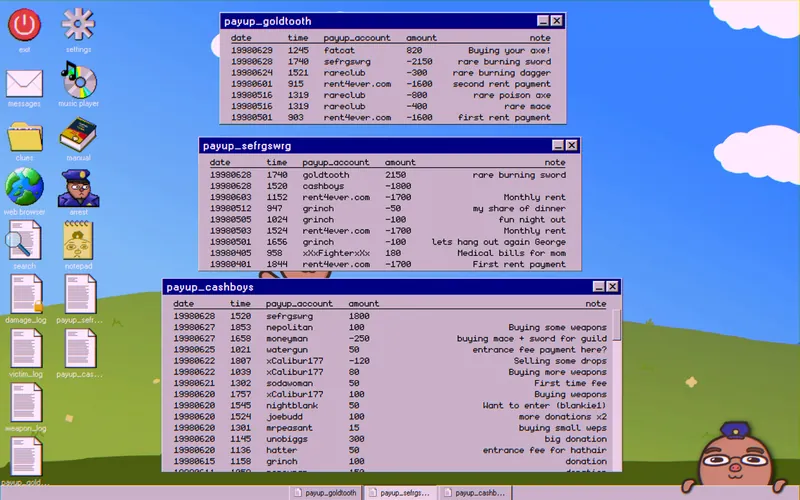
Check “sefrgswrg” next. They paid a large amount to “cashboys.” The note is blank, but the payment was likely for the sword. The “cashboys” account shows no more sword mentions or large transactions.
“CA$H BOY$” is also a guild in the game. This points to a CA$H BOY$ member killing xCalibur32 and taking the sword. You can download the guild’s members list, but its forum is locked.
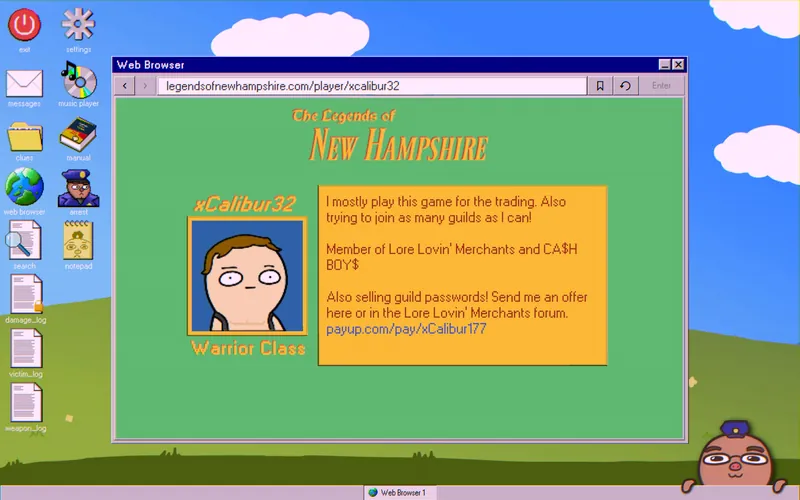
To get into the forum, look up xCalibur32’s profile. He belongs to both CA$H BOY$ and Lore Lovin’ Merchants. The Joining a Guild article lists all fifteen featured guilds. The Lore Lovin’ Merchants call themselves experts on game lore, and you must pass their “LSAT” test to access their forum. The wiki articles hold the answers.

- Ford Swamp: The Locations article says the third area, “Manchester Grasslands,” was named after “Chester Grass.” It’s a play on words, and “Manford Swamplands” works the same way.
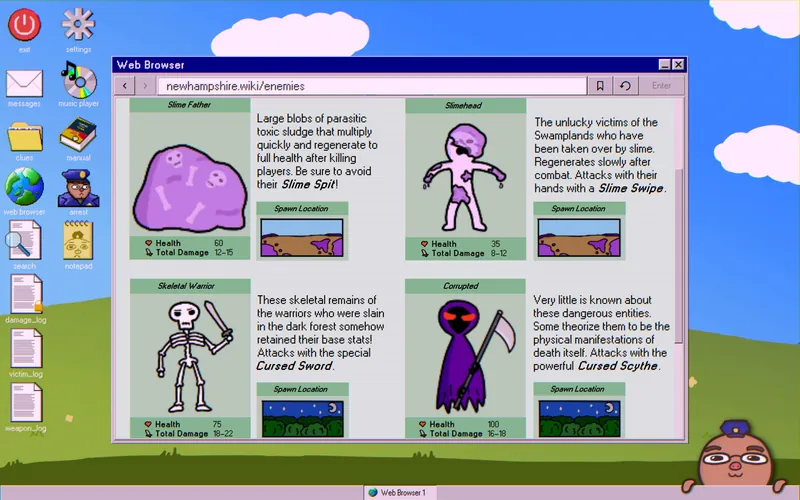
- vitjuice: The link isn’t clear beyond both being the same shade of purple. The slime regenerates enemies (Enemies article) and the juice restores player health (Quests article), which may be the intended logic, but this isn’t confirmed.
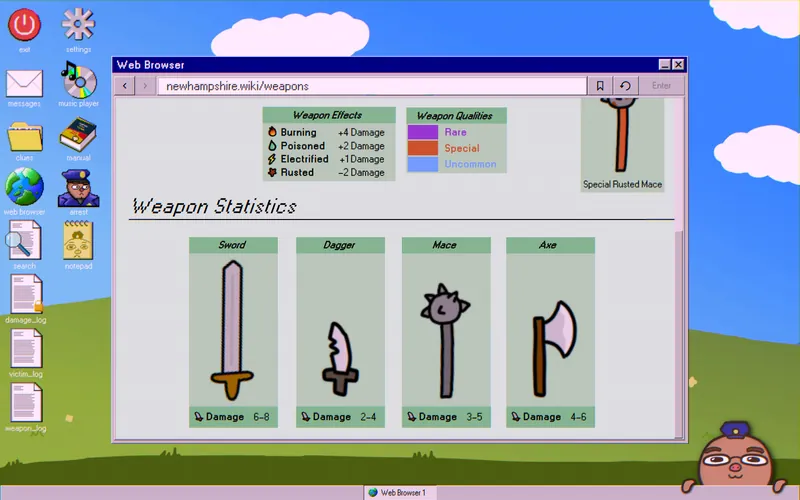
- poison: The Enemies article says “cursed” weapons are used by the “Skeletal Warrior” or the “Corrupted.” Skeletal Warriors are slain warriors who keep their base stats. The Weapons article lists sword stats but not scythe stats, so use the sword. Together, a Skeletal Warrior can deal 16–20 damage (Warrior = 10–12, Sword = 6–8). Searching the damage log for
damage_takenwhereweapon_used = "Cursed Sword"shows a range of 18–22, so “Cursed” adds +2.
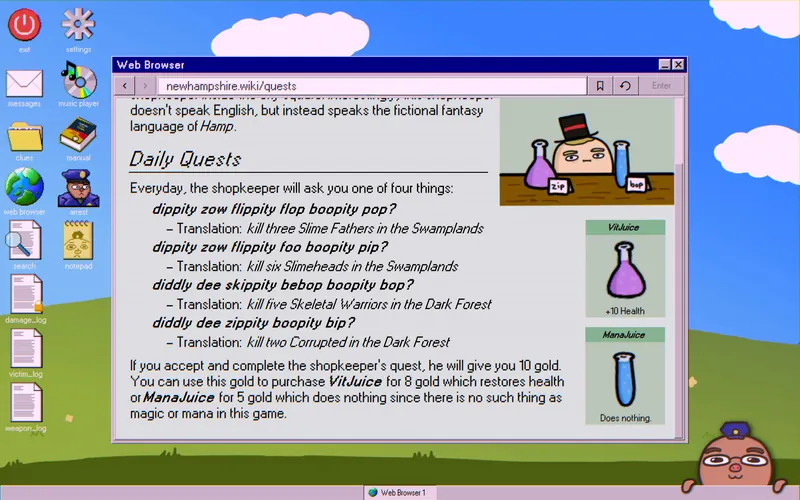
- corrupted: “Hamp” only appears in the Quests article. Work out the answer by counting how often each word is used.
- diddly dee: Use the same method as question 4, in reverse.
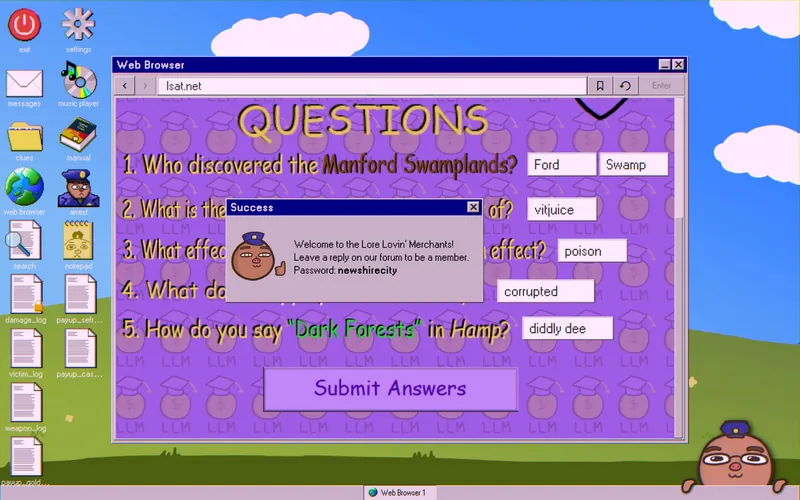
With every answer correct, you get the Lore Lovin’ Merchants forum password: newshirecity.
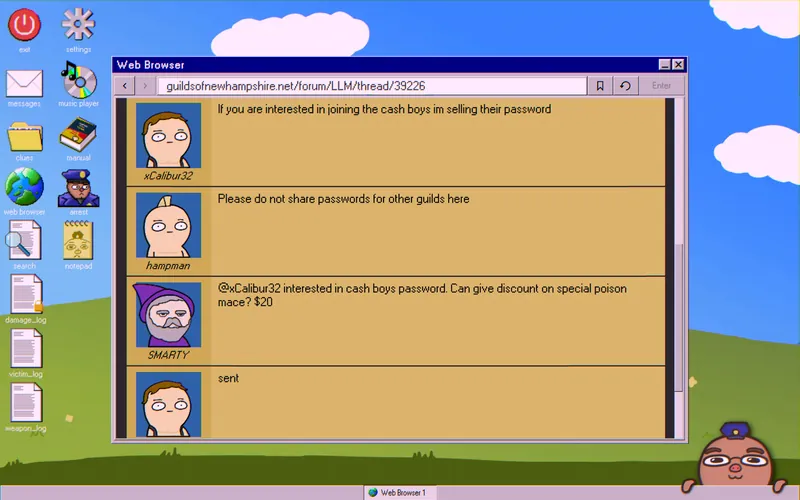
On the forum, under the post “Worth it to join other guilds?”, xCalibur32 offers to sell the CA$H BOY$ forum password. A player named “SMARTY” accepts the offer for $20.
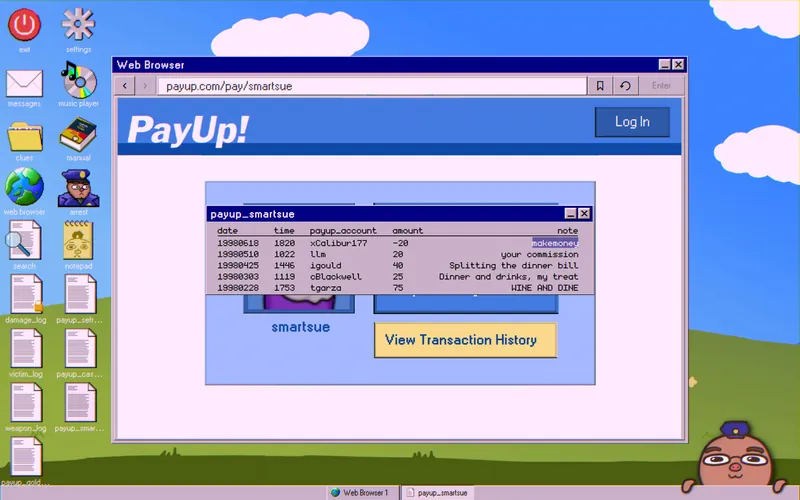
Look up SMARTY in the player profile search. Their payup_account is “smartsue.” The transaction history confirms xCalibur32 sold them the password: makemoney.
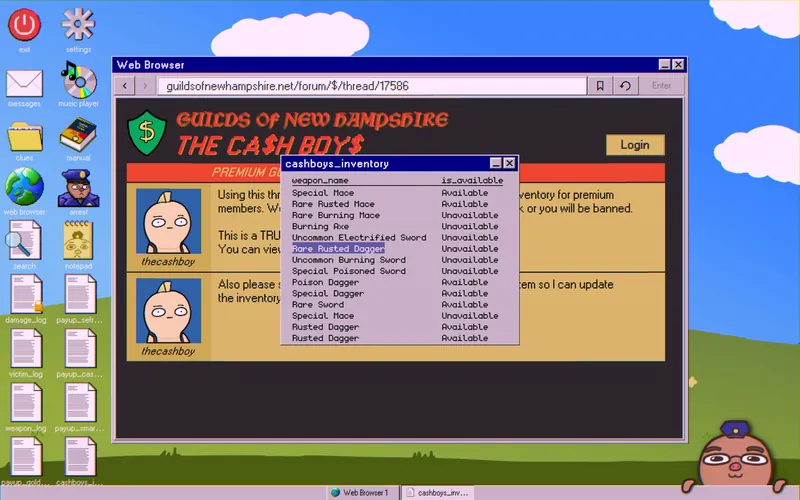
In the CA$H BOY$ forum, the “PREMIUM GUILD INVENTORY” lists a “Rare Rusted Dagger,” so only a premium member could have used it. Two threads add more: “is there only one rare rusted dagger?” confirms only one exists in the game, and “Best place to kill and loot?” names a spot that matches xCalibur32’s victim_log.
Finding the Killer
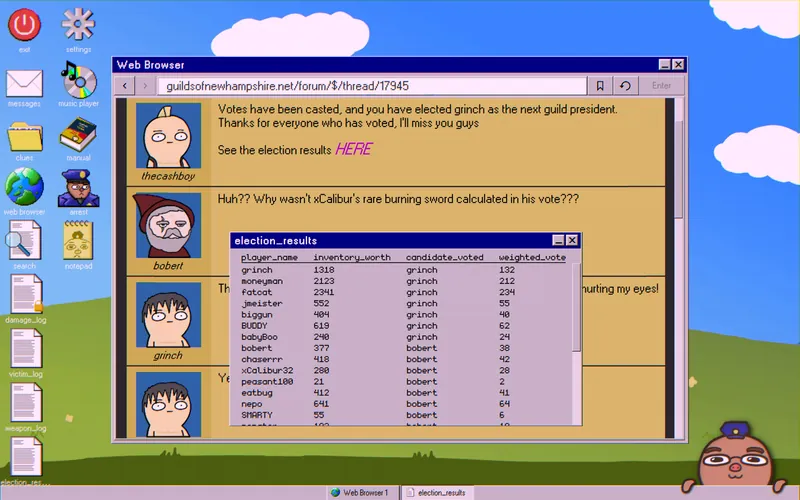
The forum also covers an election for a new guild president: the “popular” candidate “bobert” against the “rich” candidate “grinch.” Each vote was weighted by the player’s inventory. It’s strongly implied that xCalibur32 was assassinated and his sword taken so his vote would carry less weight. Download election_results to see who voted for grinch. Those players are part of the conspiracy.
Achievement: search bobert’s profile to find his PayUp account and his real name, Robert Smith. Arrest him to unlock Pictures of You(r Arrest).
You can also narrow down the killer’s class. The Weapons article says the Rare Rusted Dagger deals 0–2 damage. According to the Classes article, only the Bard has a base damage that could deal the final 9 damage. The Rogue is ruled out by its unique “First Strike” ability.
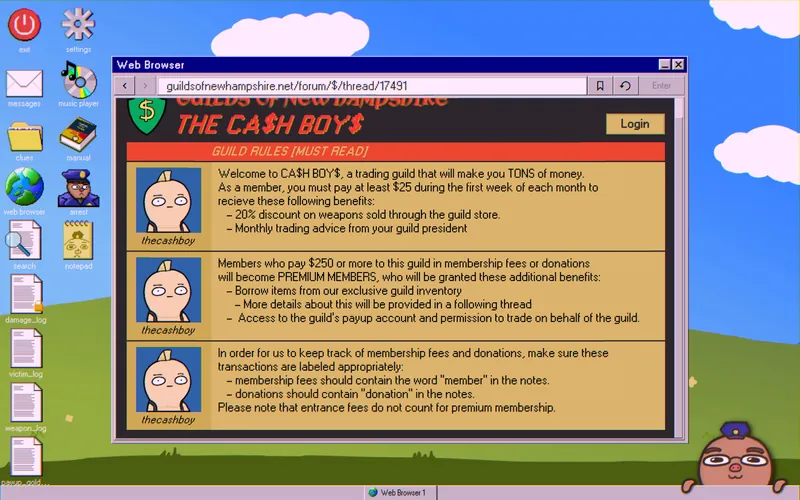
Guild rules say premium members must pay or donate $250 in total. Entry fees don’t count.
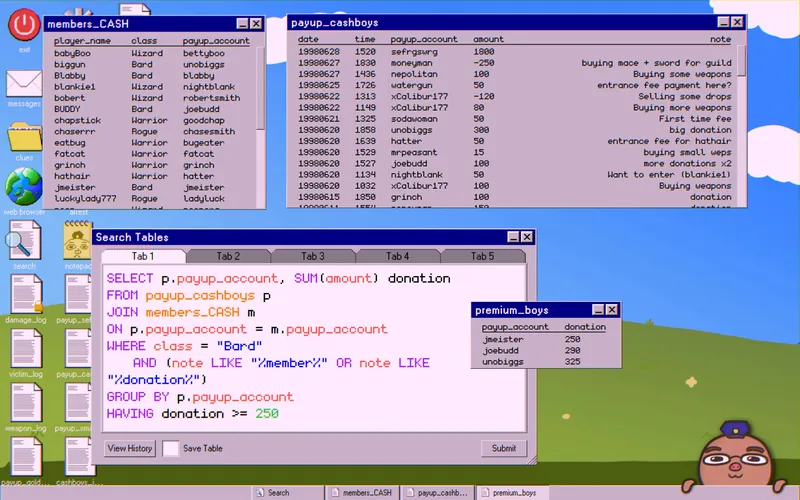
Combine these facts to find Bards with premium status:
SELECT p.payup_account, SUM(amount) donation
FROM payup_cashboys p
JOIN members_CASH m
ON p.payup_account = m.payup_account
WHERE class = "Bard"
   AND (note LIKE "%member%" OR note LIKE "%donation%")
GROUP BY p.payup_account
HAVING donation >= 250
Save it as premium_boys.
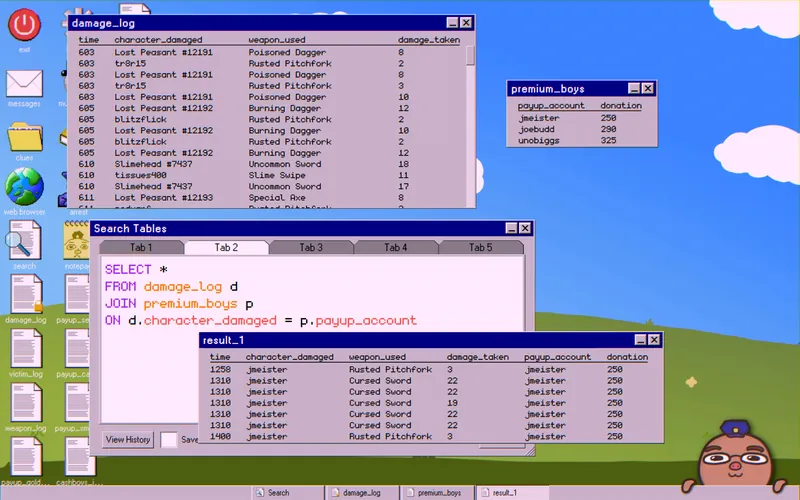
Check the damage log for each of these names. Only “jmeister” was active during xCalibur32’s playtime, and jmeister also voted for grinch:
SELECT *
FROM damage_log d
JOIN premium_boys p
ON d.character_damaged = p.payup_account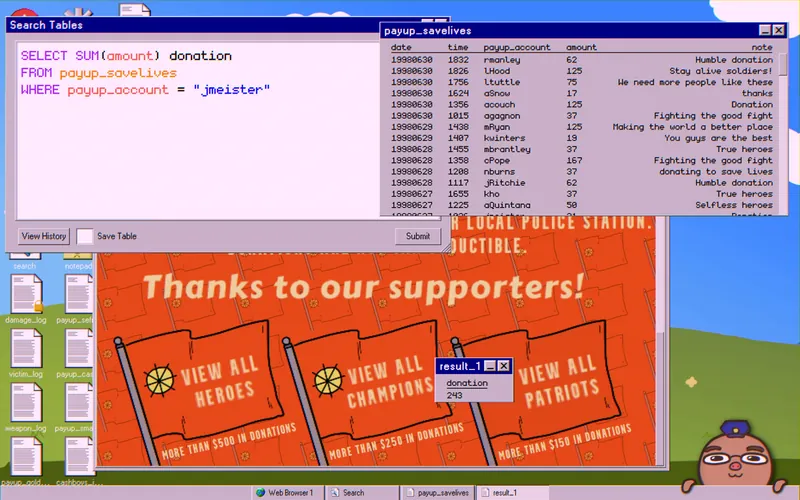
Now find his real name. His PayUp history shows regular donations to savelives.gov. That site sorts donors into lists by amount.
Add up his donations to see which list he’s on:
SELECT SUM(amount) donation
FROM payup_savelives
WHERE payup_account = "jmeister"
Download the table that matches his total. In the example run, he was a “patriot.”
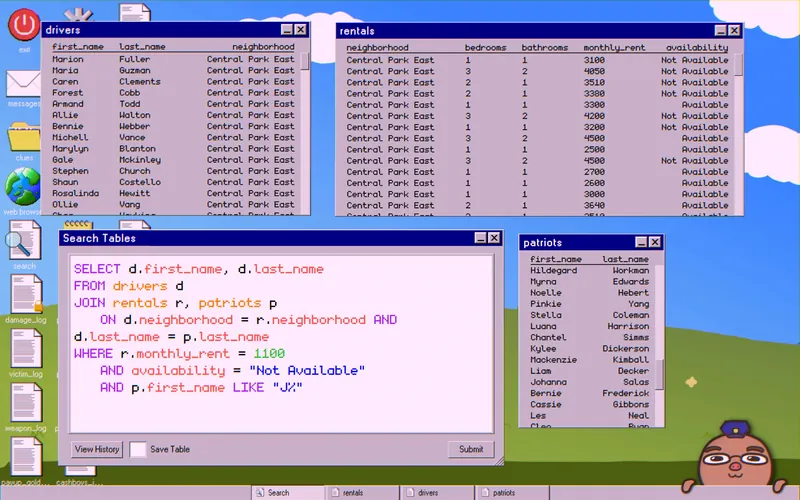
His history also shows regular payments to rent4ever.com and regular income from clowncar.com. Download the rentals table from the first and the drivers table from the second.
Put it all together to get a name:
SELECT d.first_name, d.last_name
FROM drivers d
JOIN rentals r, patriots p
ON d.neighborhood = r.neighborhood AND d.last_name = p.last_name
WHERE r.monthly_rent = 1100
AND availability = "Not Available"
AND p.first_name LIKE "J%"
Only one name should appear.
Case 8: Trouble in LZU
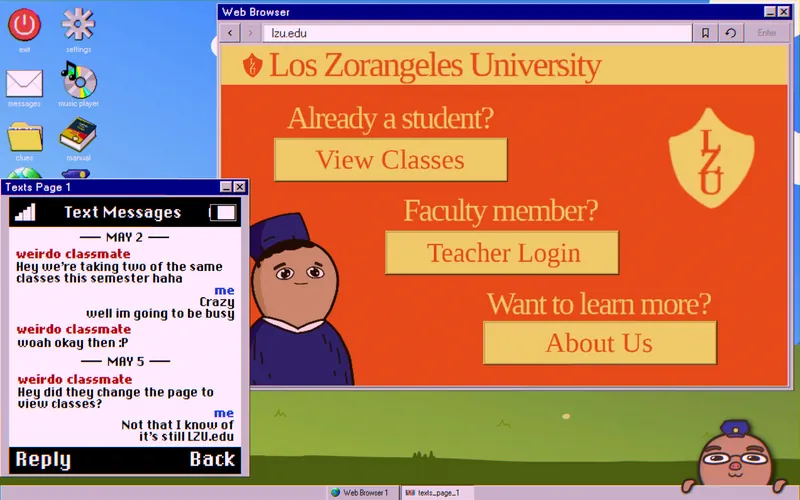
There’s been a public disturbance at a local college. Your clues are four text message screenshots from the citizen who reported it. The first text says the suspect shares two classes with the citizen and points you to lzu.edu. Ignore the dates on the texts. They don’t matter for the case.
The second text has acronyms you need to decode. For that, you need the Teacher Login, but you don’t have the password. Clicking “Forgot password?” tells you to ask the computer security expert, Professor Alan Douglas.
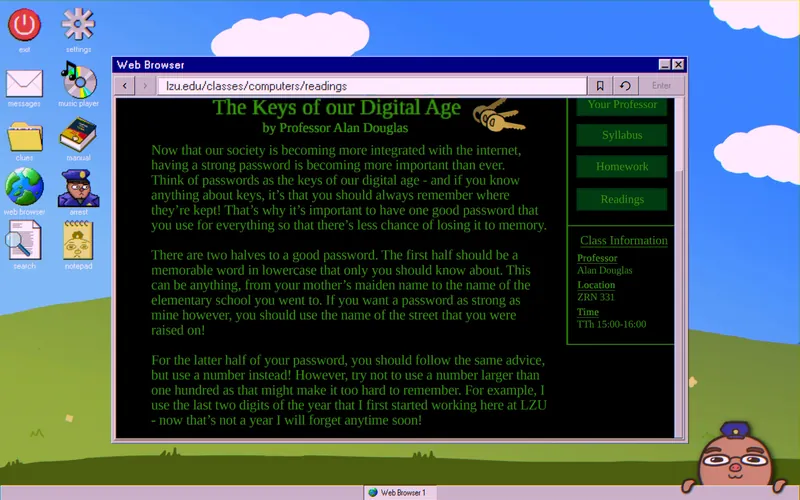
Go to View Classes, open Computer Literacy, then the Readings tab. About halfway down, Douglas says his password is the street he grew up on plus the last two digits of the year he started at LZU.

Open his Your Professor tab. The photo shows Douglas walking through an unfinished arch in a distinctive LZU hat. The page also says he grew up within 400 feet of the campus.
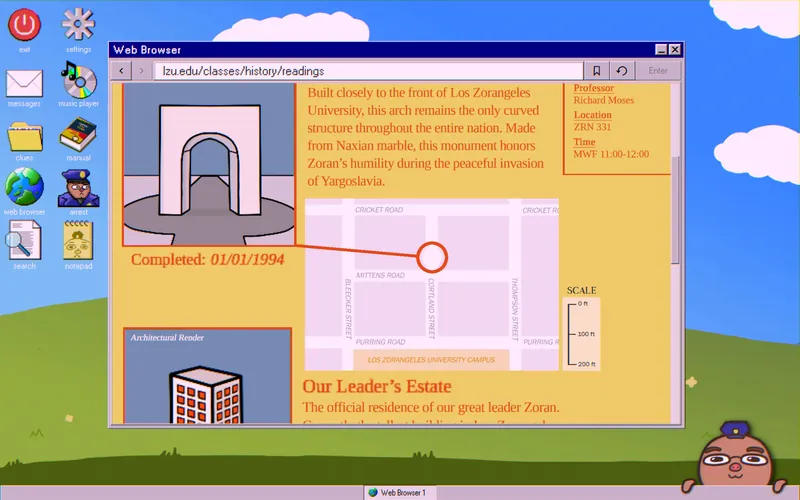
Back in View Classes, open the Readings tab of the History class. It says the arch was finished by 1994, so Douglas started working before then. It also has a scaled map of the campus and its surroundings. If he walked through the arch on his way to work, he grew up on Cortland St.

For the year, open About Us on the main page. The History of Our Logo section shows the same logo as Douglas’s hat. Together with the arch date, this means he started at LZU in ’93.
Achievement: apply to the school from the About Us tab to unlock Future Valedictorian.
Return to the Teacher Login and enter cortland93. You’re now in the Teachers Lounge.
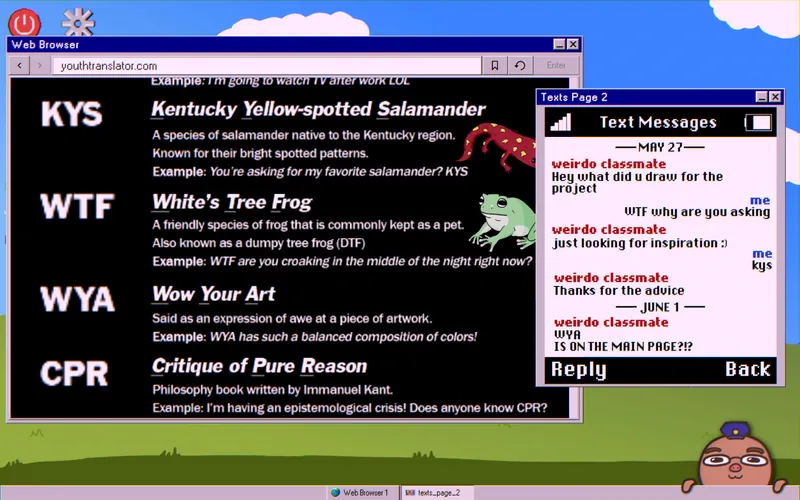
Under Discussion, the history professor asks what “LOL” means. Douglas replies with a link to youthtranslator.com, which explains the acronyms. In the second text, the suspect asks what the citizen drew (likely for Art class) and later says the citizen’s art is on the main page.
Before you leave, go to Important Data and download the Student Names table.

On the Main Page under Art, you’ll find the “White’s Tree Frog” (WTF) from the text. It belongs to Matthew Hoji. Search for him to get his student ID:
SELECT *
FROM students
WHERE last_name = "Hoji"
Save it as Matthew_Hoji. That’s the first shared class.

In the third text, the suspect asks about homework answers. Work out the answers to find out which class they share. Only Economics, Philosophy, and Science have homework.
The “A,” “B,” and “C” letters change with each playthrough, so the shared class will also be different for you.
Economics
- Answer: Los Zorangeles has a flourishing private sector with little state intervention. Find it in the Readings tab.
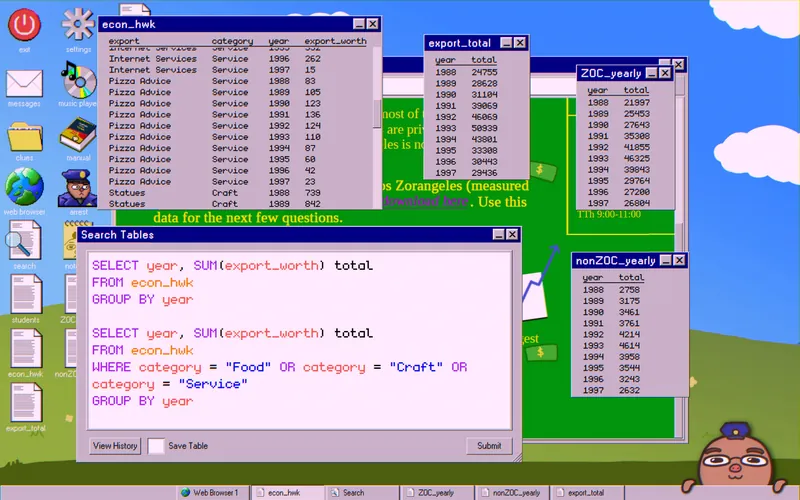
For questions 2 and 3, download the provided table. Sum the exports per year in total, then for ZOCs and non-ZOCs separately (as defined in the Readings):
SELECT year, SUM(export_worth) total
FROM econ_hwk
GROUP BY year
Save it as export_total.
SELECT year, SUM(export_worth) total
FROM econ_hwk
WHERE category = "Energy" OR category = "Media" OR category = "Industry"
GROUP BY year
Save it as ZOC_yearly.
SELECT year, SUM(export_worth) total
FROM econ_hwk
WHERE category = "Food" OR category = "Service" OR category = "Craft"
GROUP BY year
Save it as nonZOC_yearly.
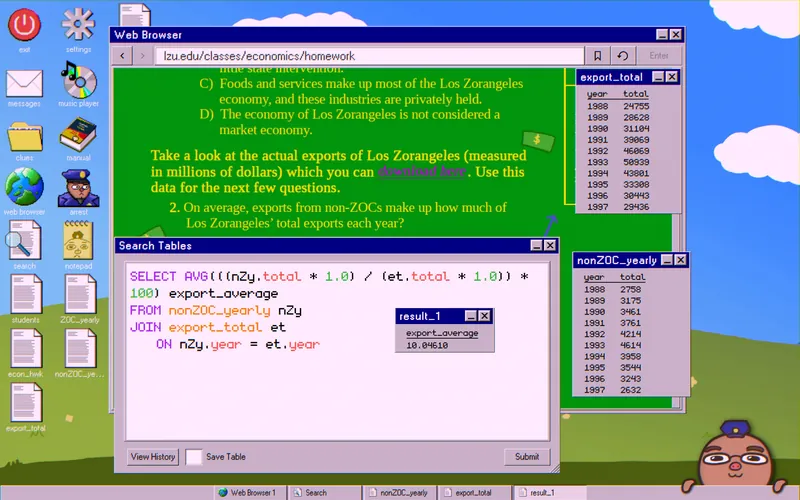
- Answer: 10%. Divide the non-ZOC yearly total by the overall export total to get the average:
SELECT AVG(((nZy.total * 1.0) / (et.total * 1.0)) * 100) export_average
FROM nonZOC_yearly nZy
JOIN export_total et
ON nZy.year = et.year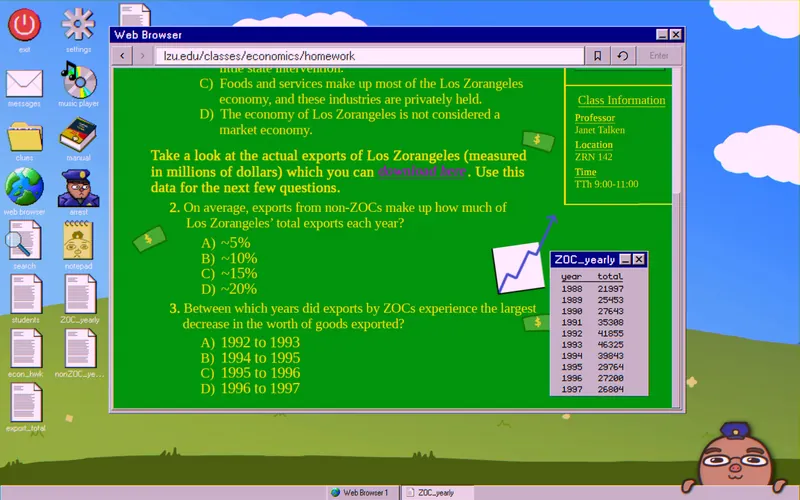
- Answer: 1994–1995. The
ZOC_yearlytable shows the biggest drop.
Philosophy
- Answer: Zoran universally inspires positive emotion, which exists beyond space and time. Find it in the Readings tab.
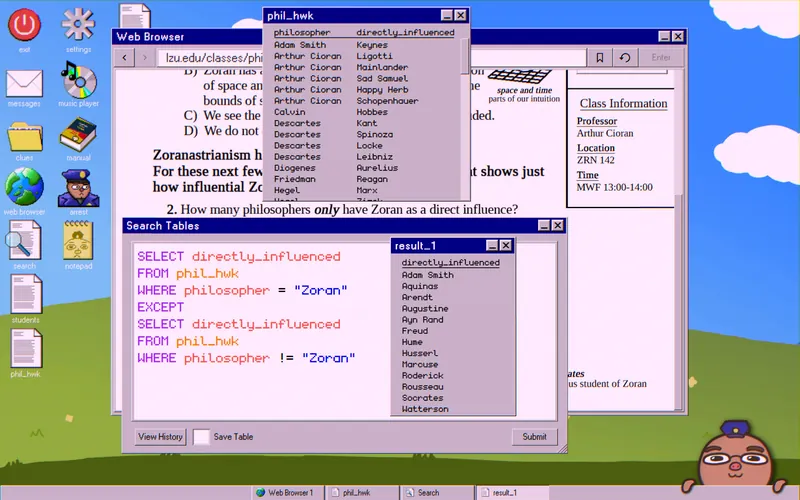
- Answer: 13. Use
EXCEPTto remove philosophers influenced by anyone other than Zoran:
SELECT directly_influenced
FROM phil_hwk
WHERE philosopher = "Zoran"
EXCEPT
SELECT directly_influenced
FROM phil_hwk
WHERE philosopher != "Zoran"
Count the names by hand or with a second COUNT query.
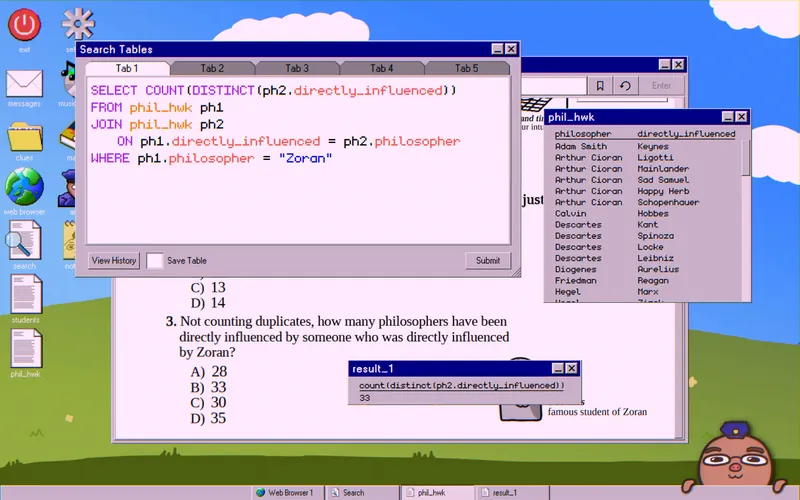
- Answer: 33. Join the table to itself:
SELECT COUNT(DISTINCT(ph2. directly_influenced))
FROM phil_hwk ph1
JOIN phil_hwk ph2
ON ph1. directly_influenced = ph2. philosopher
WHERE ph1. philosopher = "Zoran"
Science
- Answer: 50%. Find it in the Readings tab.
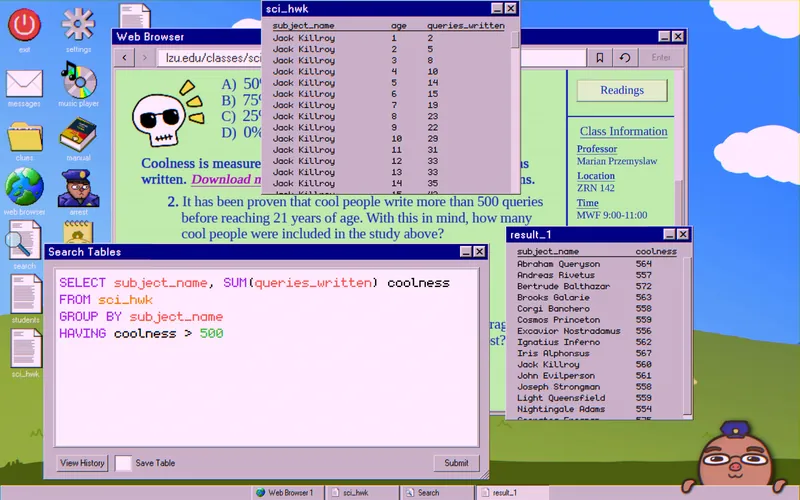
- Answer: 15. Group by
subject_nameand sumqueries_written:
SELECT subject_name, SUM(queries_written) coolness
FROM sci_hwk
GROUP BY subject_name
HAVING coolness > 500
Count the names by hand or with a second COUNT query.
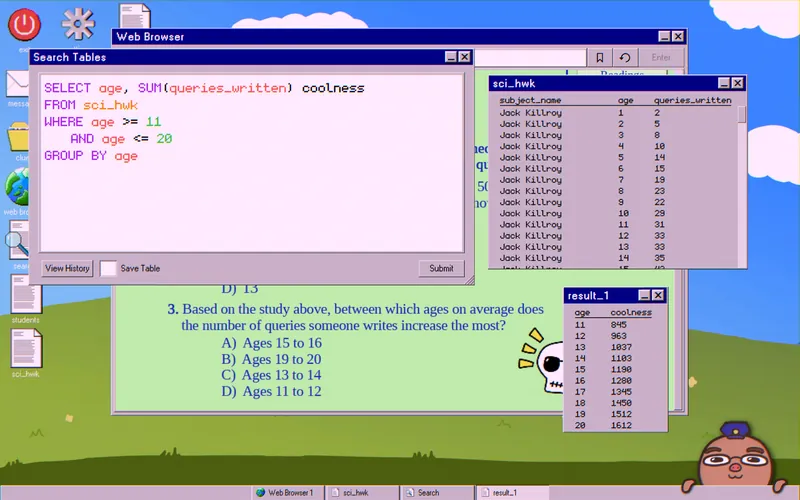
- Answer: Ages 11 to 12. Group by
ageand sumqueries_written:
SELECT age, SUM(queries_written) coolness
FROM sci_hwk
WHERE age >= 11
AND age <= 20
GROUP BY age
Finding the Suspect
The same text says the student next to the suspect scored more than the suspect and Hoji combined. The suspect also admits attending less than half of the classes.
From the Syllabus tab of your shared class, download the seating assignments, attendance sheet, and midterm scores. In the example run, the shared class was Philosophy.
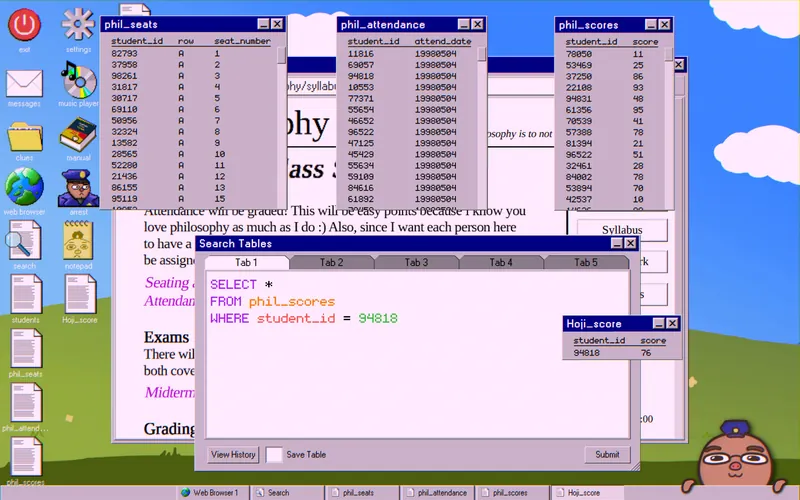
First, get Hoji’s score:
SELECT *
FROM phil_scores
WHERE student_id = 94818
Save it as Hoji_score.
The scores range from 10 (lowest) to 100 (highest). So the suspect scored between 10 and (99 − Hoji’s score). The student next to them scored between (Hoji’s score + 11) and 100. In the example run, Hoji scored 76: the suspect had 10–23 and their neighbor had 87–100.
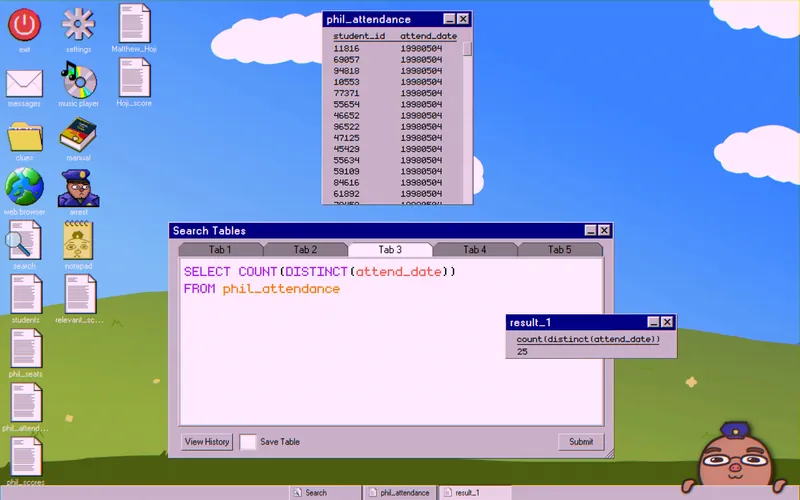
Next, count the distinct class days:
SELECT COUNT(DISTINCT(attend_date))
FROM phil_attendance
The example run had 25 class days.
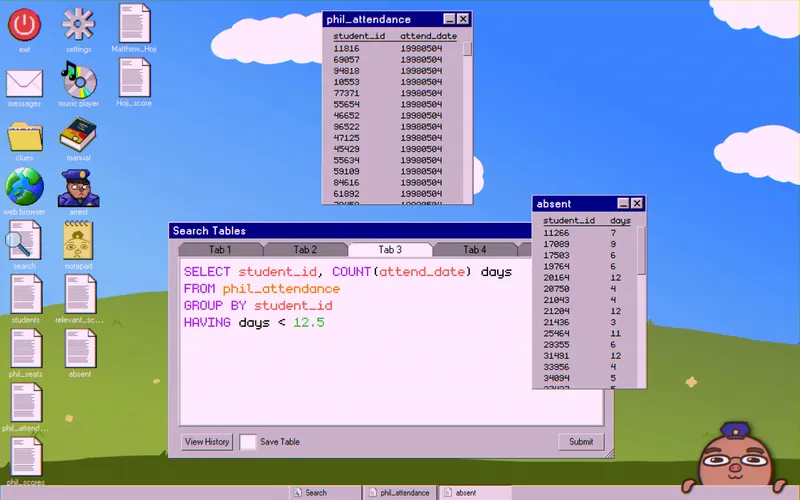
Use that number to find students who came to less than half the classes:
SELECT student_id, COUNT(attend_date) days
FROM phil_attendance
GROUP BY student_id
HAVING days < 12.5
Save it as absent.
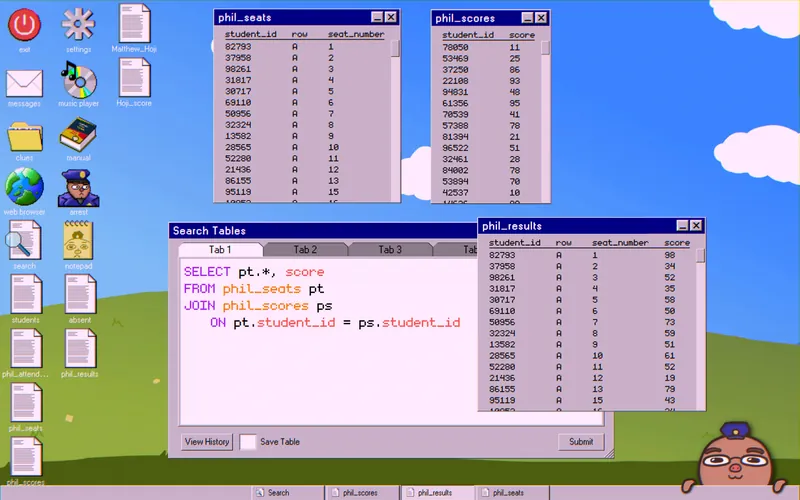
Join the phil_seats and phil_scores tables:
SELECT pt.*, score
FROM phil_seats pt
JOIN phil_scores ps
   ON pt.student_id = ps.student_id
Save it as phil_results.
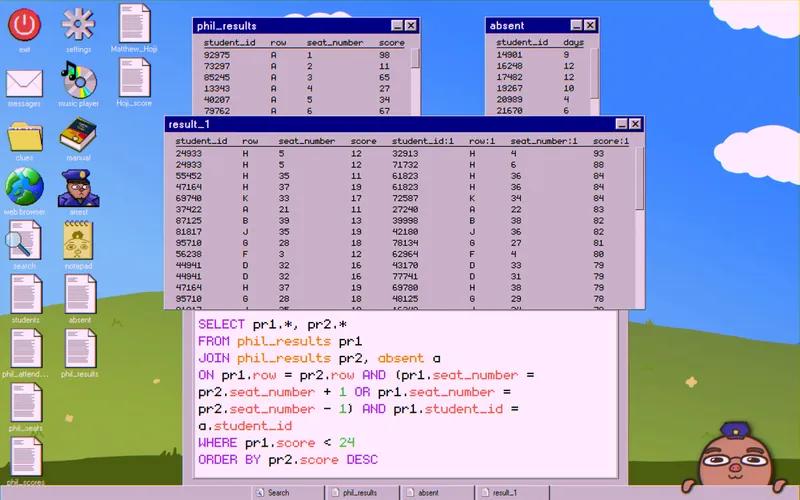
Finally, join phil_results to itself and to absent to catch the suspect:
SELECT pr1.*, pr2.*
FROM phil_results pr1
JOIN phil_results pr2, absent a
   ON pr1.row = pr2.row AND (pr1.seat_number = pr2.seat_number + 1 OR pr1.seat_number = pr2.seat_number - 1) AND pr1.student_id = a.student_id
WHERE pr1.score < 24
ORDER BY pr2.score DESC
Look for scores above (Hoji’s score + 10). Then make sure the high score minus the low score next to it is greater than Hoji’s score. In the example run, the only score above 86 was 97, and the low score next to it was 12. 97 − 12 = 85, which is above Hoji’s 76.
Look up the student_id of that low score in the students table.
Case 9: A Last Case If You Want

Your supervisor hands you this case without any details. The only clue is a front page newspaper clipping. In one corner, it reports that the Los Zorangeles Private Pension Program went bankrupt and gives its site, LZPPP.com. Below it, another story covers the mysterious death of Jerry Webb and his blog, bigleeks.net. Open both sites.
Tracing the Fraud

LZPPP.com leads to another site, broker.com. bigleeks.net has a TOP SECRET page with a heavily redacted plan to defraud shareholders.
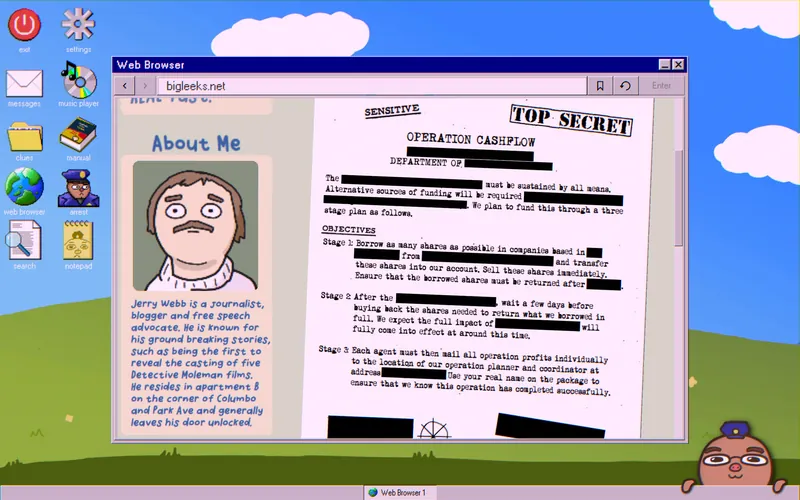
Stage 1 is hard to read, but it says shares are borrowed, transferred, sold right away, and then returned.

Go to broker.com. It lists eight major stocks, each with its own price history and transaction history. Download all sixteen tables. Each stock also has its own website and physical address.
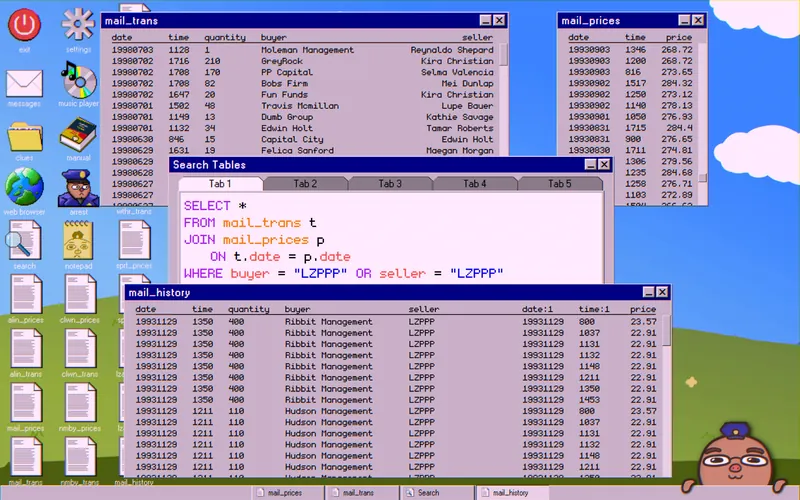
Join each transaction table with its price table to see what LZPPP has been doing:
SELECT *
FROM mail_trans t
JOIN mail_prices p
   ON t.date = p.date
WHERE buyer = "LZPPP" OR seller = "LZPPP"
Save it as mail_history. Repeat with clwn_trans and clwn_prices, and so on for each stock. If a query returns nothing, LZPPP didn’t trade that stock and you can skip it. In the example run, the four stocks worth checking were “mail,” “clwn,” “wthr,” and “lzar.”
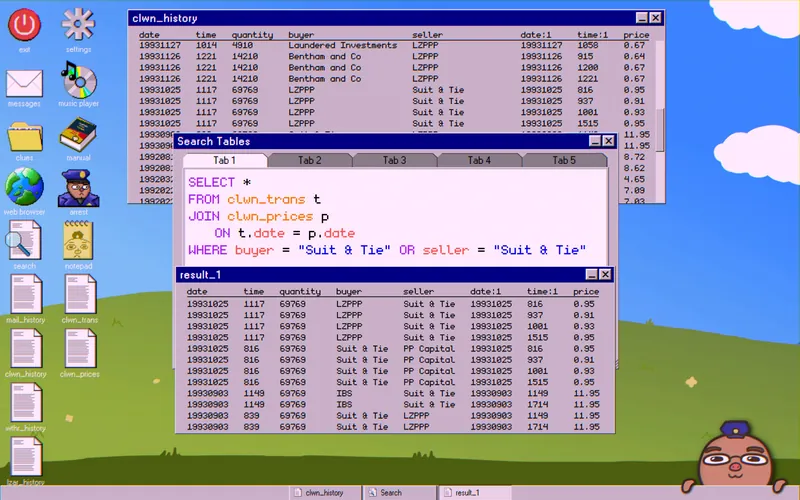
The FAQ page says transfers show up in the transaction table but not in the price table. So look for a time when shares were bought or sold that doesn’t appear in the price table. Also watch for a sharp price drop and an unusually large number of shares changing hands. Together, these clues point to one trader: Suit & Tie.
To confirm, search for Suit & Tie’s activity. They sold the shares right away, then transferred them back to LZPPP after the waiting period described in Stage 2.
Miss Suit
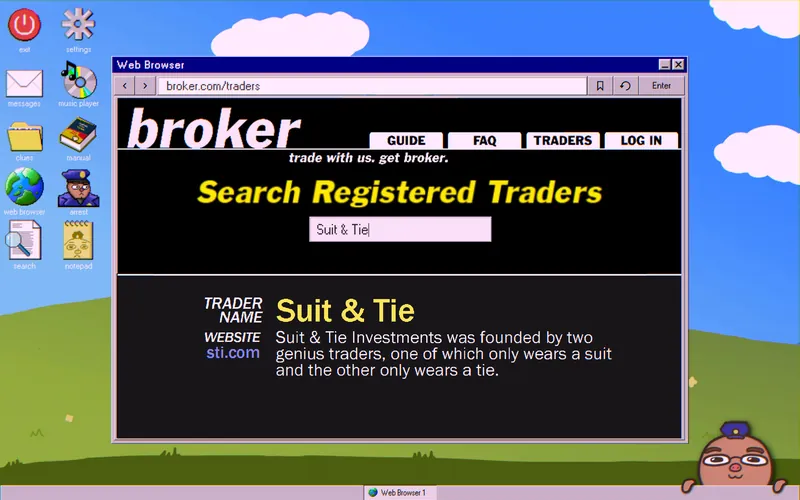
Search for “Suit & Tie” in the TRADERS tab. Their website is sti.com, which introduces two money mules: Miss Suit and Mister Tie (both aliases).
To find Miss Suit, study her photo. The clues, in any order:
- She’s on a plane. Download the flights table from lzairlines.com.
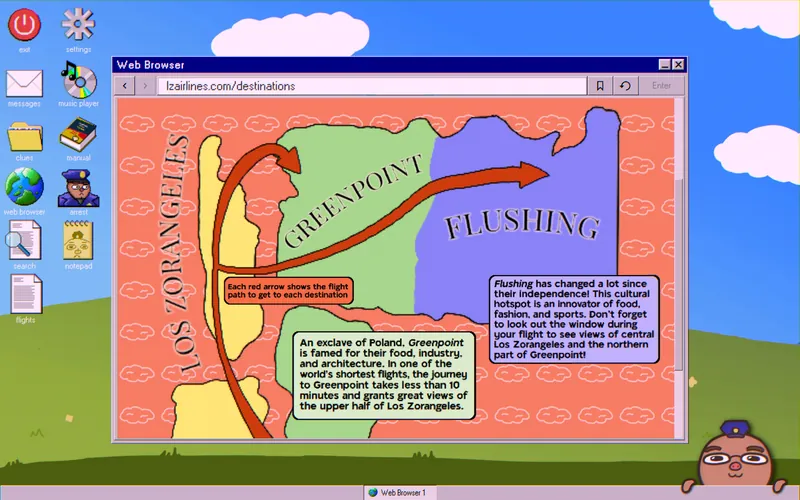
- The Destinations tab of lzairlines.com shows a flight path from Los Zorangeles to Flushing. The shape of the river in her window matches it.

- The Dining tab of lzairlines.com shows she’s sitting in Business Class at least.

- The weather outside her window is “PARTLY CLOUDY.” Download the past_forecasts table from skyforetold.com.

- The in-flight screen shows the Uncles playing big ball. Download the games_history table from bigball.com. Their schedule shows games always start after 2:15 PM.
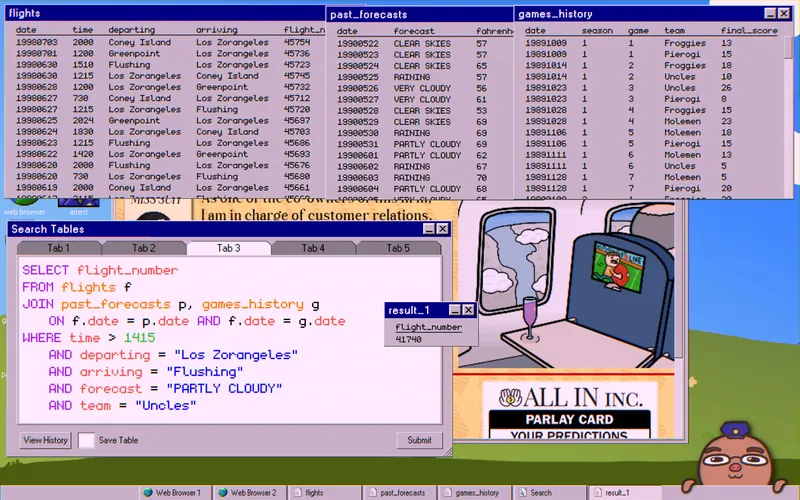
Join all of these to get the exact flight_number:
SELECT flight_number
FROM flights f
JOIN past_forecasts p, games_history g
   ON f.date = p.date AND f.date = g.date
WHERE time > 1415
   AND departing = "Los Zorangeles"
   AND arriving = "Flushing"
   AND forecast = "PARTLY CLOUDY"
   AND team = "Uncles"
Only one number should come back. In the example run, it was 41740.
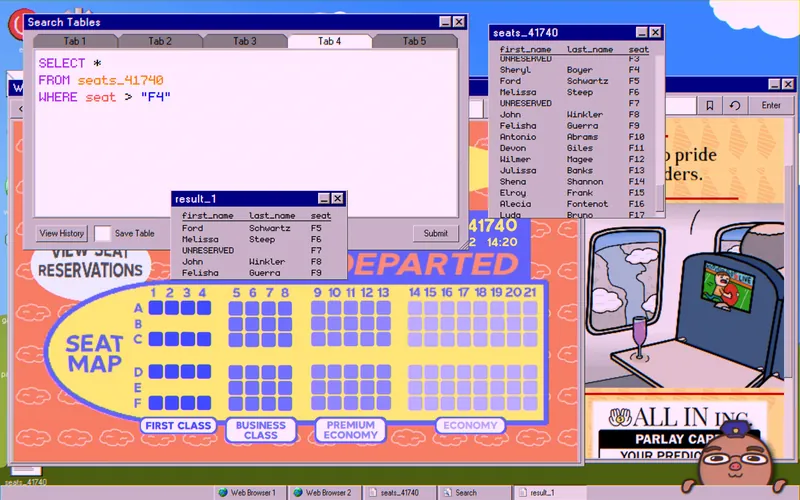
Enter the flight_number in the Check Me In section and look at the Seat Map. In the photo, Miss Suit sits in a left window seat with a table to her right and a man in front of her. On the map, that puts her in the F6–F8 range. Check by hand or with a query. In the example run, she was in F6, and the name was Melissa Steep.
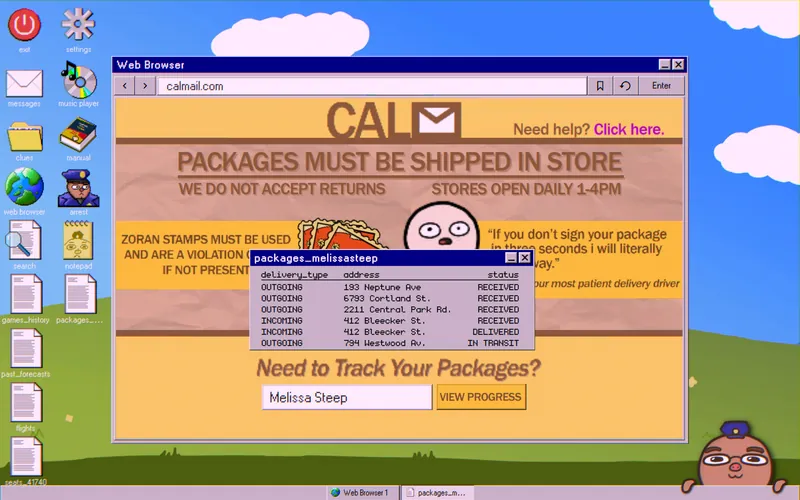
On calmail.com, enter her name into the package tracker. Keep the resulting table for later.
Mister Tie
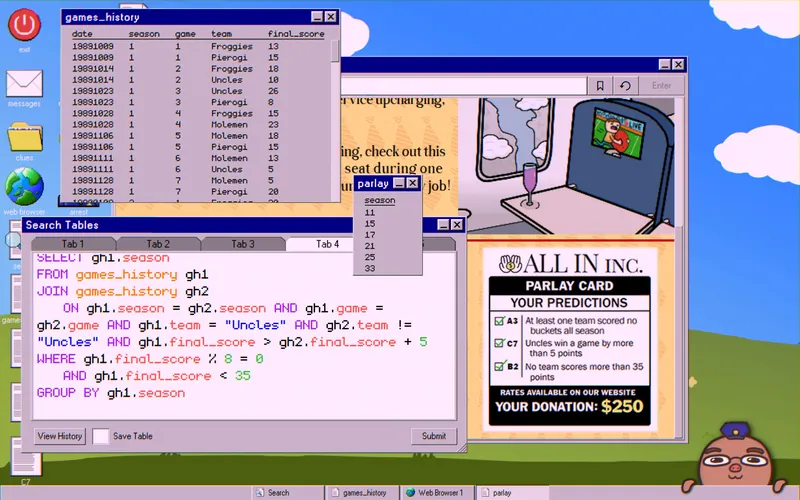
The sti.com site shows a parlay card from “All In Inc.” with the conditions he met to win. On goallin.com, download the bigball_bets table under How to Play and the winners table under View Winners.
Achievement: try to donate under the Donate Now tab to unlock Donation Addict.
Use games_history to find the seasons that met every condition:
SELECT gh1.season
FROM games_history gh1
JOIN games_history gh2
   ON gh1.season = gh2.season AND gh1.game = gh2.game AND gh1.team = "Uncles" AND gh2.team != "Uncles" AND gh1.final_score > gh2.final_score + 5
WHERE gh1.final_score % 8 = 0
   AND gh1.final_score < 35
GROUP BY gh1.season
Save it as parlay.
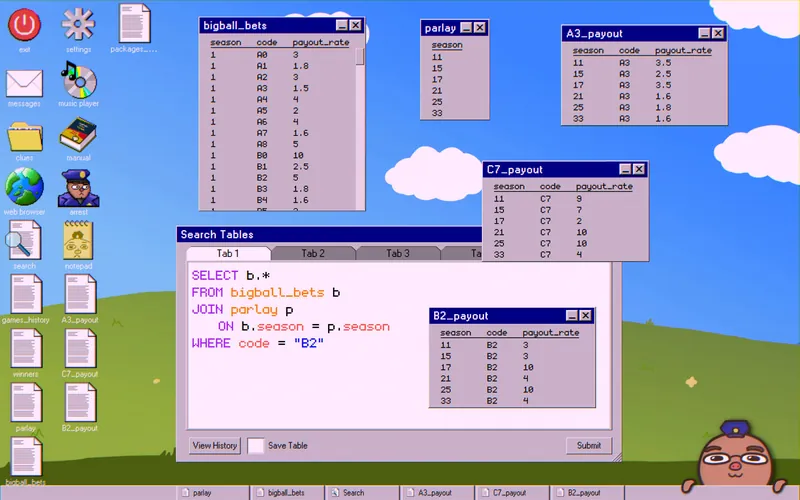
In the example run, the seasons were 11, 15, 17, 21, 25, and 33. Use them to work out the final payout multiplier and narrow down the winner. To make it easier to read, split each payout_rate by season and code:
SELECT b.*
FROM bigball_bets b
JOIN parlay p
   ON b.season = p.season
WHERE code = "A3"
Save it as A3_payout. Repeat with “C7” and “B2,” saving them as C7_payout and B2_payout.
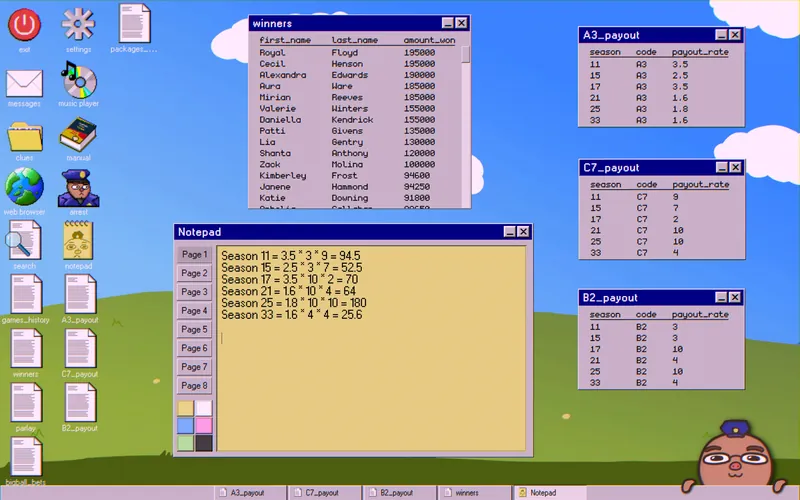
In the notepad app (or on paper), write down the final multiplier for each season. You’ll use these to match names to their amount_won:
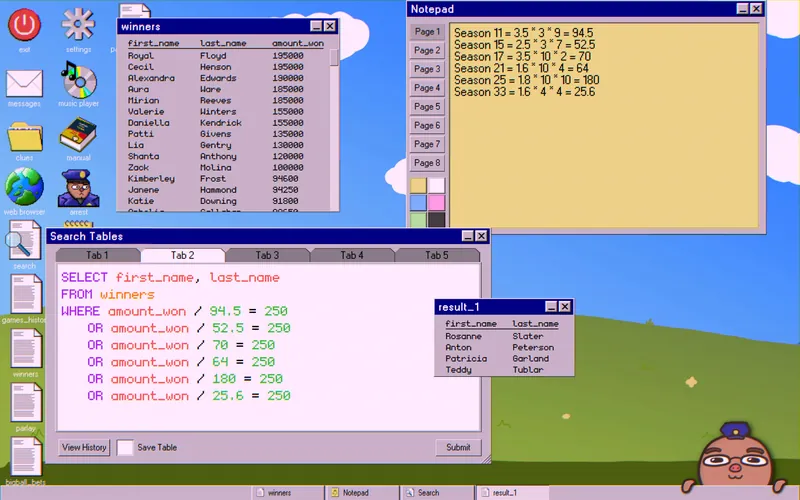
SELECT first_name, last_name
FROM winners
WHERE amount_won / 94.5 = 250
   OR amount_won / 52.5 = 250
   OR amount_won / 70 = 250
   OR amount_won / 64 = 250
   OR amount_won / 180 = 250
   OR amount_won / 25.6 = 250
Your multipliers may not match these.
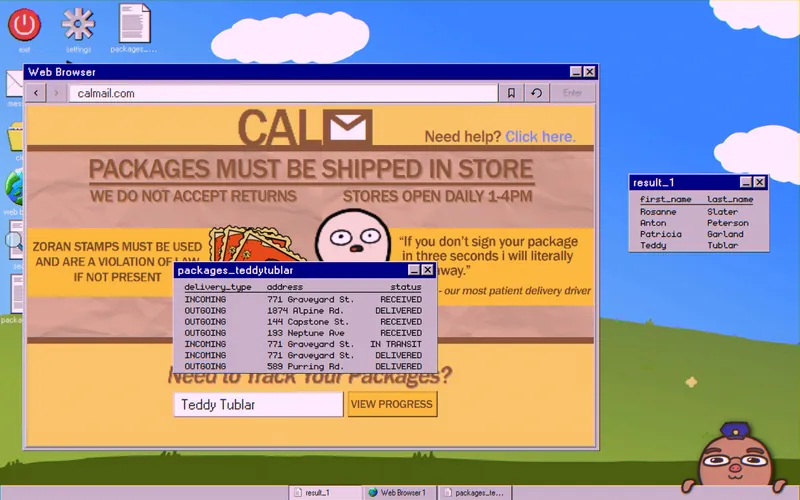
Enter each name into the calmail.com package tracker. Only one name will return a table. In the example run, it was Teddy Tublar.
The Mastermind
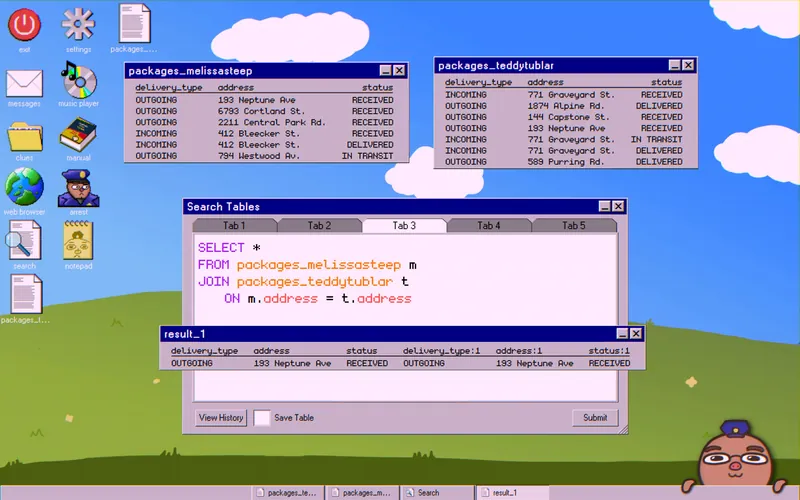
Join Tublar’s table with Steep’s to find a single shared address:
SELECT *
FROM packages_melissasteep m
JOIN packages_teddytublar t
   ON m.address = t.address
If it worked, the shared address is “193 Neptune Ave.”
Item four of the GUIDE tab on broker.com says this is the physical address of the company’s owners, defined as the largest shareholder.
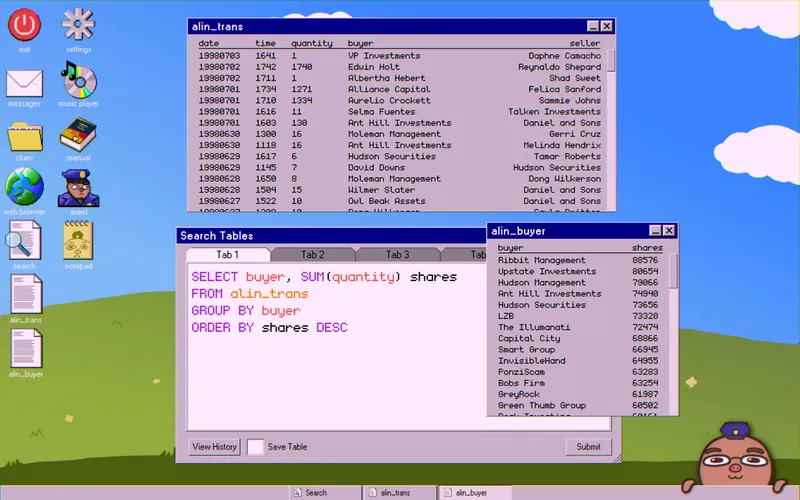
To find them, sum the shares for each buyer and seller in the alin_trans table:
SELECT buyer, SUM(quantity) shares
FROM alin_trans
GROUP BY buyer
ORDER BY shares DESC
Save it as alin_buyer. Replace buyer with seller to get the seller totals, and save that as alin_seller.
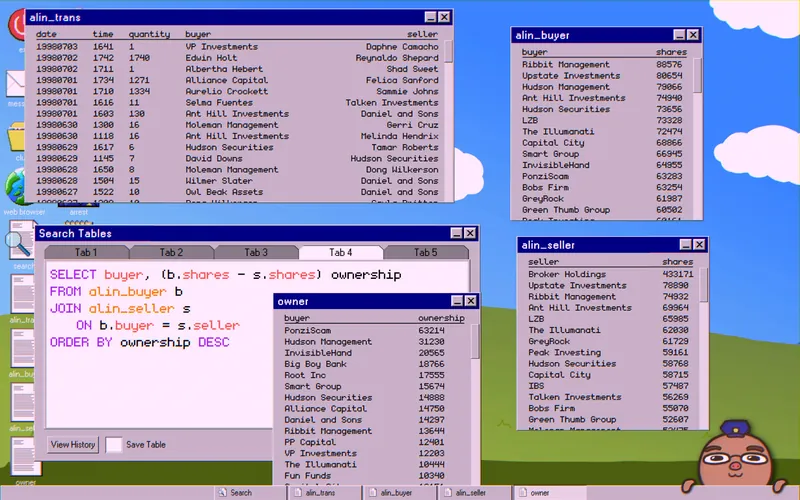
Then subtract to find the owner:
SELECT buyer, (b.shares - s.shares) ownership
FROM alin_buyer b
JOIN alin_seller s
   ON b.buyer = s.seller
ORDER BY ownership DESC
The company at the top should be “PonziScam,” which makes it the owner.
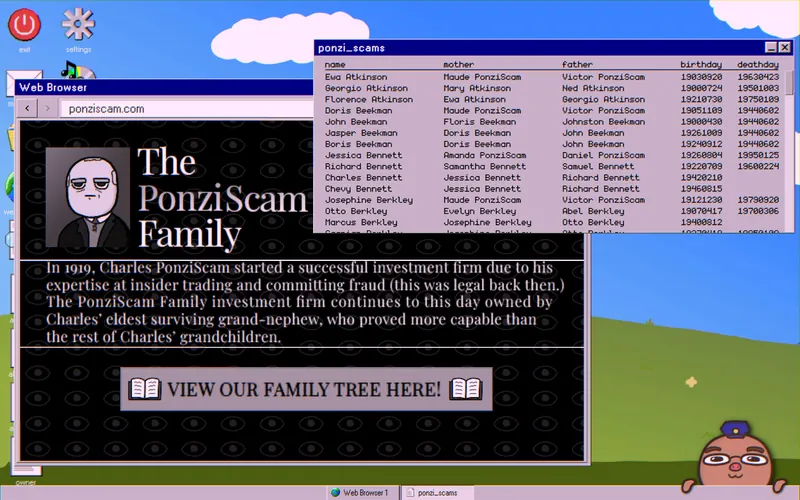
Look up PonziScam in the TRADERS tab on broker.com. It links to ponziscam.com. A paragraph about founder Charles PonziScam says ownership now belongs to his eldest surviving grand-nephew, the oldest male grandchild of his siblings. Download the family tree table.
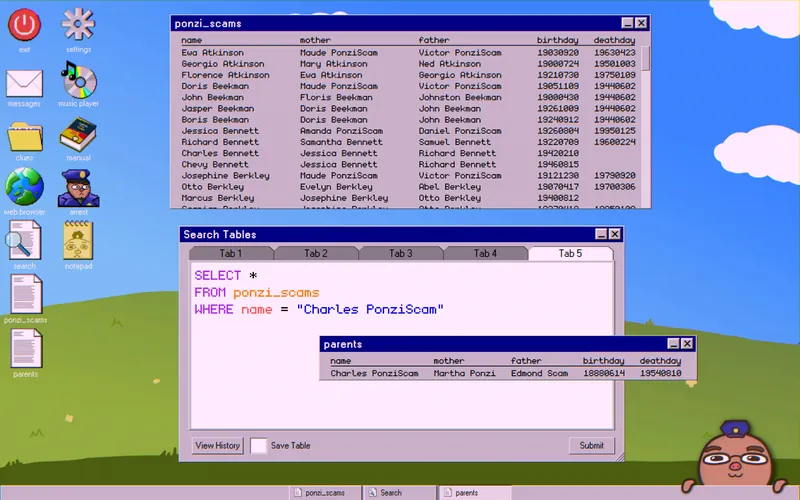
First, find Charles PonziScam’s parents:
SELECT *
FROM ponzi_scams
WHERE name = "Charles PonziScam"
Save it as parents.
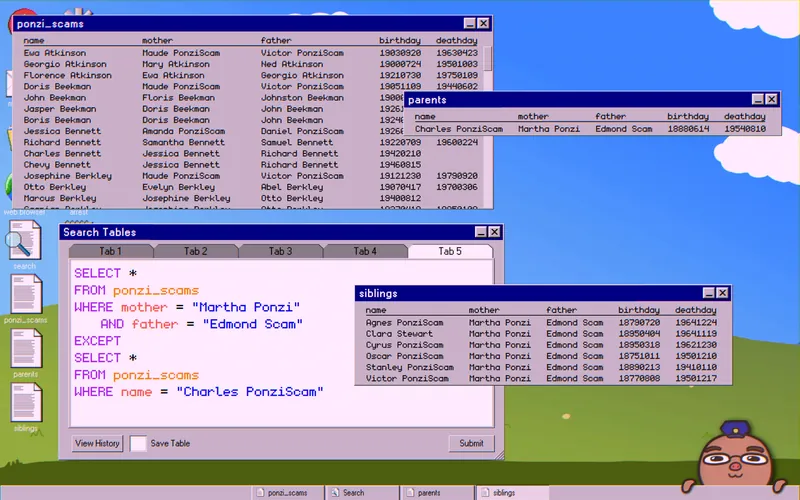
Use the parents’ names to find his siblings:
SELECT *
FROM ponzi_scams
WHERE mother = "Martha Ponzi"
   AND father = "Edmond Scam"
EXCEPT
SELECT *
FROM ponzi_scams
WHERE name = "Charles PonziScam"
Save it as siblings.
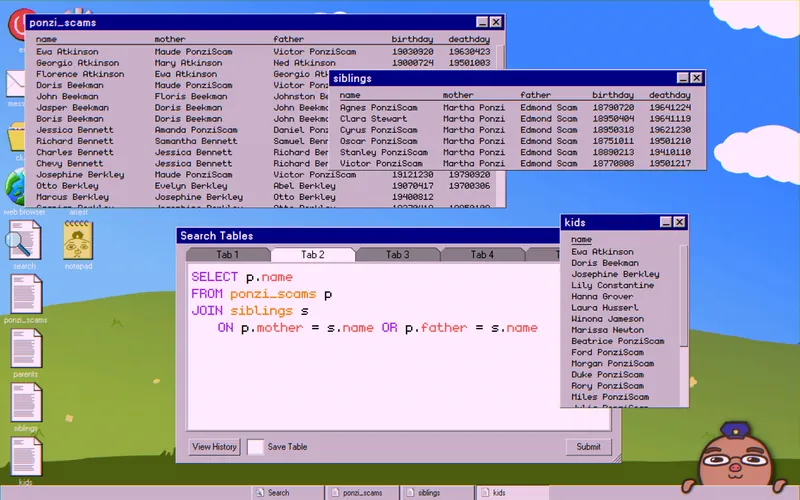
Next, find the siblings’ children:
SELECT p.name
FROM ponzi_scams p
JOIN siblings s
   ON p.mother = s.name OR p.father = s.name
Save it as kids.
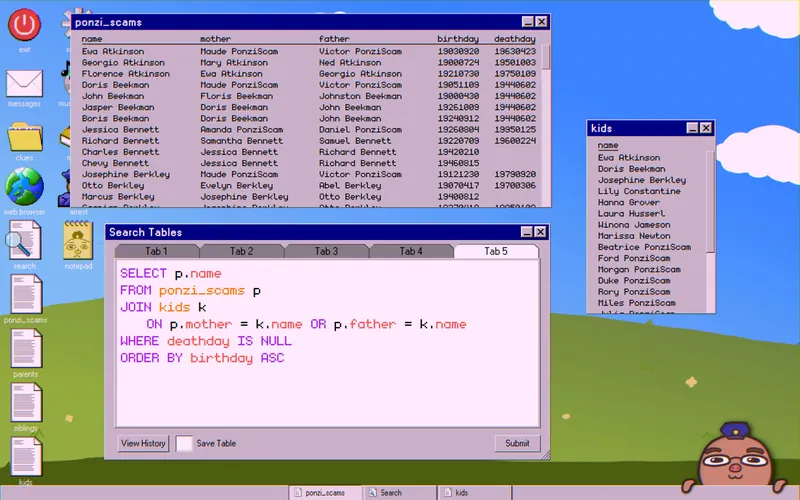
Last, find their children:
SELECT p.name
FROM ponzi_scams p
JOIN kids k
   ON p.mother = k.name OR p.father = k.name
WHERE deathday IS NULL
ORDER BY birthday ASC
The first name in the list is the mastermind.
Case 10: Here’s the Plan
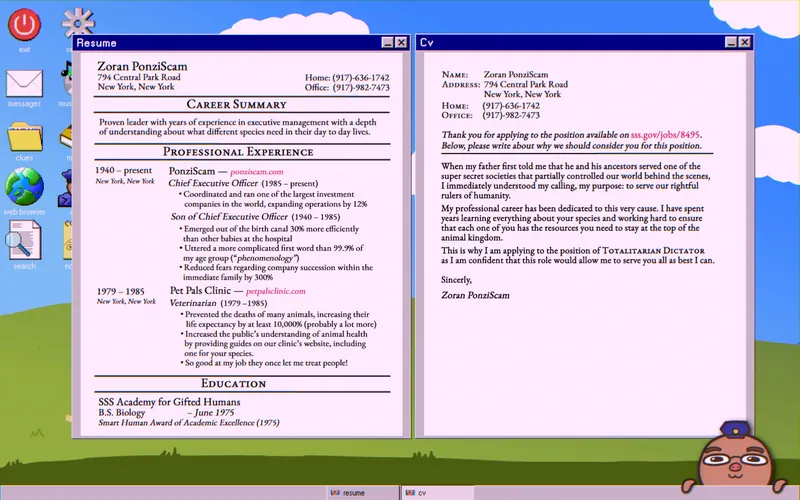
Your supervisor has a plan to bring down Zoran. His message gives you his username and password for lztimes.gov/login. Your job is to publish the truth about who really runs things. Your first clues are Zoran’s Resume and CV.

They hint that a secret group of animals holds power. To confirm it, read the Caring for Your Pets page on petpalsclinic.com. It describes nine animals, what each one eats, and what each one does.
Zoran’s Security Questions
Go to sss.gov/jobs. You can enter “Zoran PonziScam” as the name on the login screen, but you don’t have his password. Enter his name and press Reset Password to get three security questions:
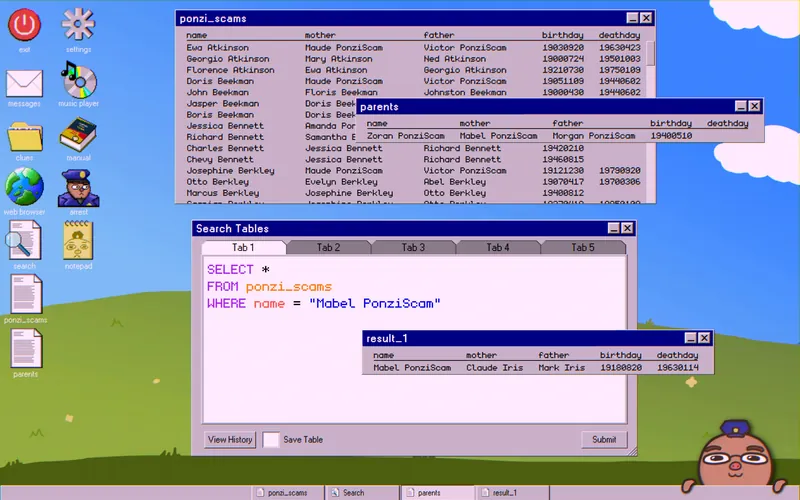
- Iris: Download the family tree from ponziscam.com. Search for Zoran’s parents with
WHERE name = "Zoran PonziScam", then for his mother’s parents withWHERE name = "Mabel PonziScam". Both of her parents have the surname “Iris.”
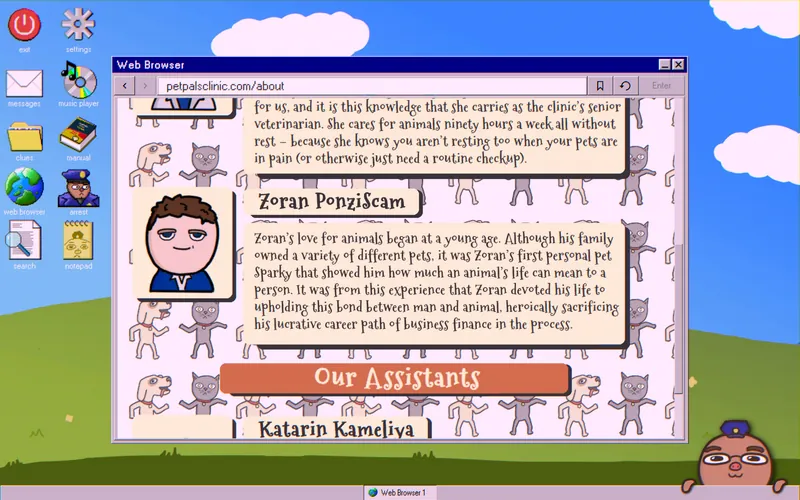
- Sparky: The About Us page on petpalsclinic.com lists the clinic’s staff, including Zoran. His paragraph mentions his first pet, “Sparky.”

- Downtown General: petpalsclinic.com has a notice saying it doesn’t treat human patients. Click the link for more info. It lists two other hospitals. Given Zoran’s age, he was most likely born in the older one.
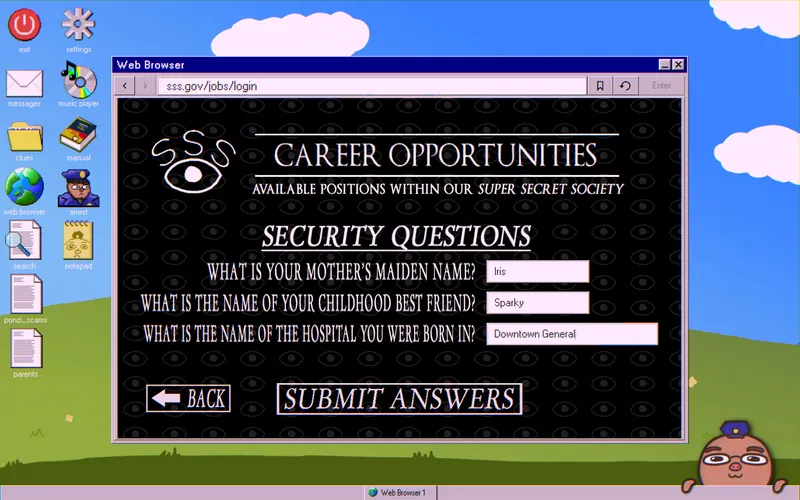
With all three right, you can reset his password to anything you like. This opens the Career Opportunities page with its job postings.
Tracing the Products
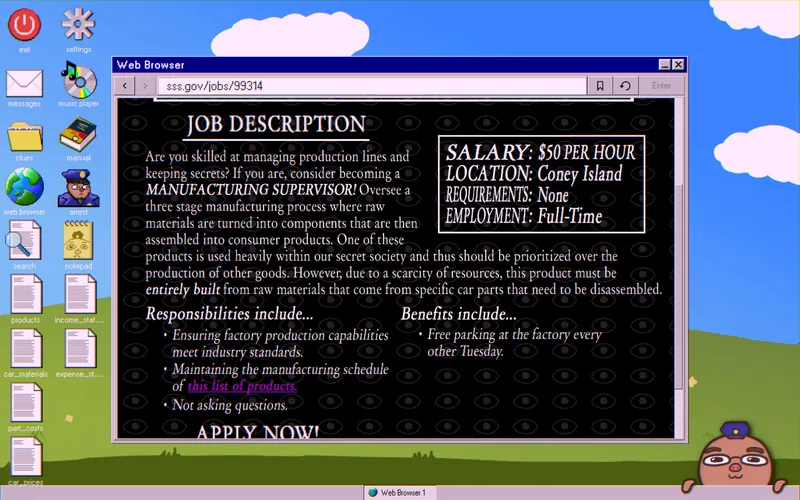
The “product manufacturing” ad explains that car part components are being used to make certain products. Download their products table.
To see what they need, read the listing from Powolny Automobile Company. They want someone to cook the books, because their accounts show a gap caused by siphoning car parts to make these products.
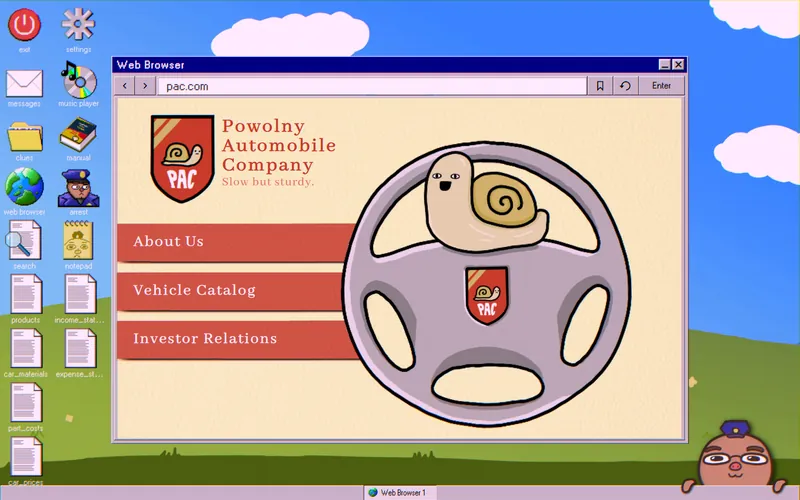
On pac.com, download all five tables: car_materials, part_costs, car_prices, income_statement, and expense_statement.
Achievement: the pac.com homepage has a steering wheel with a snail on it. Click the shield button to unlock Honk.
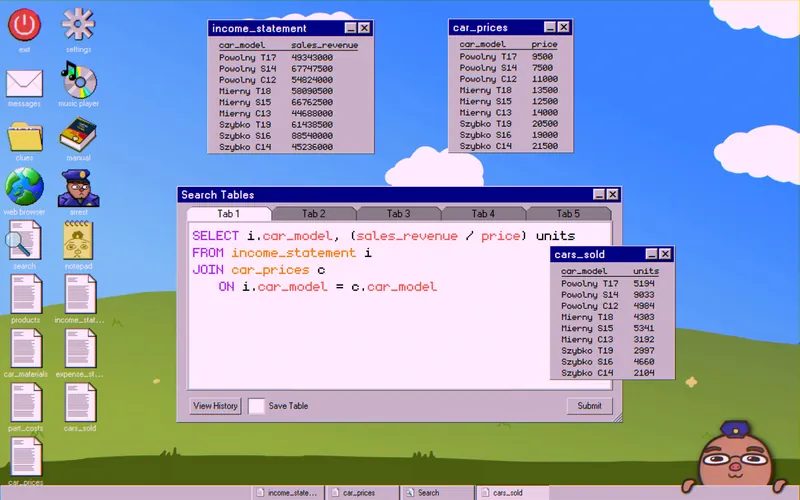
Join income_statement and car_prices to get the number of cars sold:
SELECT i.car_model, (sales_revenue / price) units
FROM income_statement i
JOIN car_prices c
   ON i.car_model = c.car_model
Save it as cars_sold.
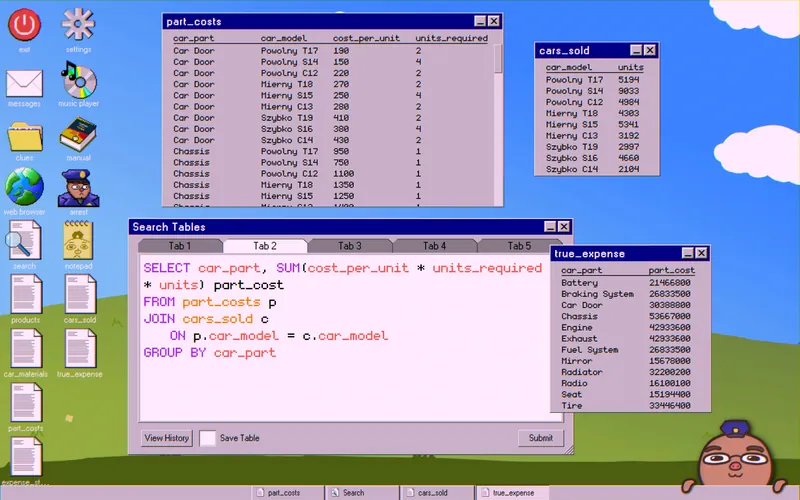
Join it with part_costs to see what Powolny really spent on parts:
SELECT car_part, SUM(cost_per_unit * units_required * units) part_cost
FROM part_costs p
JOIN cars_sold c
   ON p.car_model = c.car_model
GROUP BY car_part
Save it as true_expense.
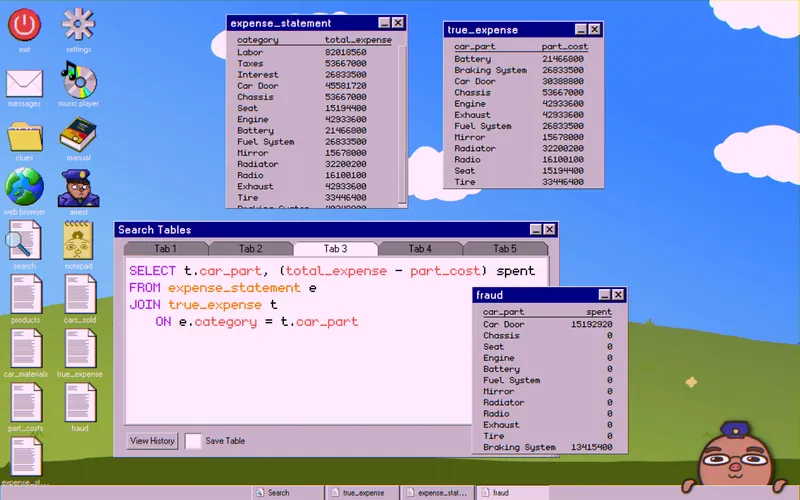
Then find the gap between Powolny’s expense_statement and the real spending:
SELECT t.car_part, (total_expense - part_cost) spent
FROM expense_statement e
JOIN true_expense t
   ON e.category = t.car_part
Save it as fraud. This shows which parts were siphoned to make the products. In the example run, they were “Car Door” and “Braking System.”
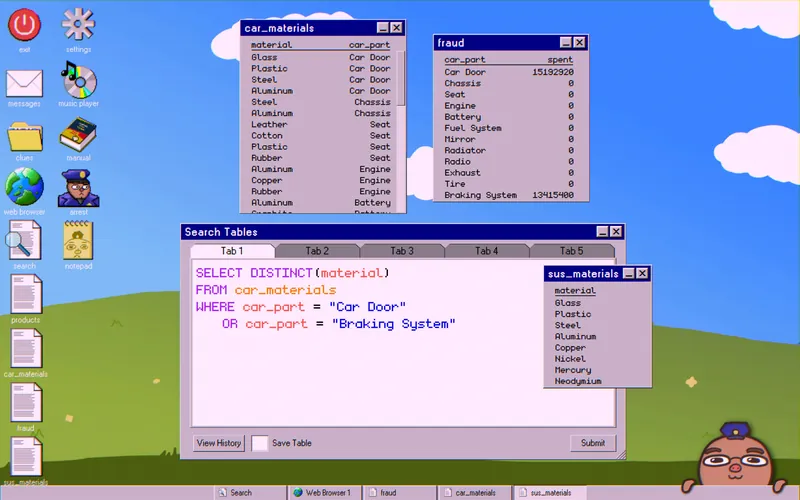
With the parts known, use the car_materials table to see which raw materials were taken:
SELECT DISTINCT(material)
FROM car_materials
WHERE car_part = "Car Door"
   OR car_part = "Braking System"
Save it as sus_materials.
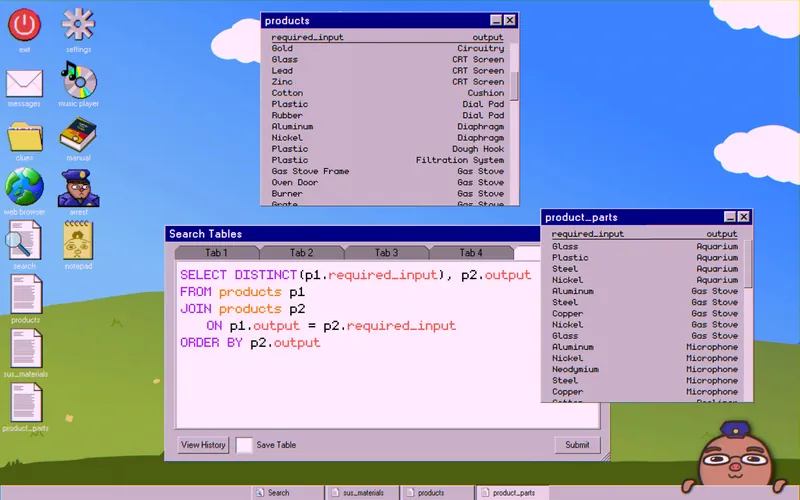
Before looking at the products, join the products table to itself to see which raw materials each product needs:
SELECT DISTINCT(p1.required_input), p2. output
FROM products p1
JOIN products p2
   ON p1.output = p2.required_input
ORDER BY p2.output
Save it as product_parts.
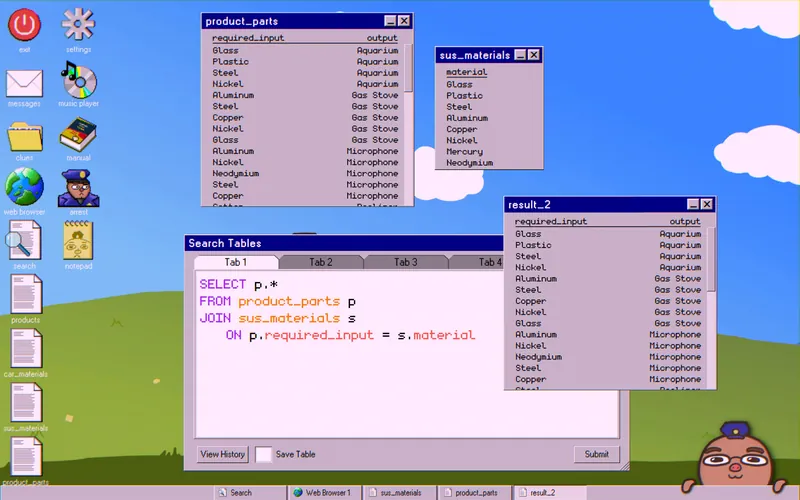
Now join product_parts with sus_materials to see which products the siphoned materials could make:
SELECT p.*
FROM product_parts p
JOIN sus_materials s
   ON p.required_input = s.material
The result looks like the product_parts table. Compare the two. If an output has fewer raw materials here than in product_parts (or whatever you named it), the secret society isn’t making it, and you can rule out that animal. This should remove about half the list.
Finding the Farm
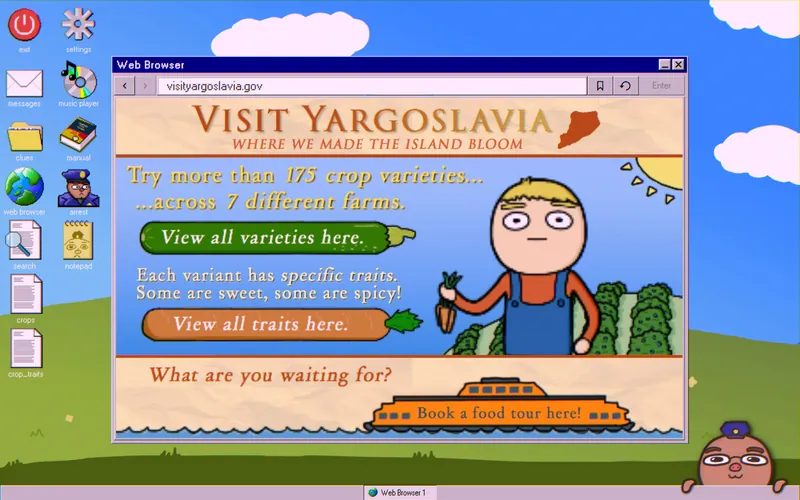
You’ve narrowed the list by what the animals do. Now work out what they eat. Go back to sss.gov/jobs and open the listing from the Calizorania Department of Tourism. It links to visityargoslavia.gov, which shows the crops grown on seven farms. Download the crops and crop_traits tables and keep them for later.
Achievement: if you’ve visited every other website in the game, this one should unlock Webtrotter.
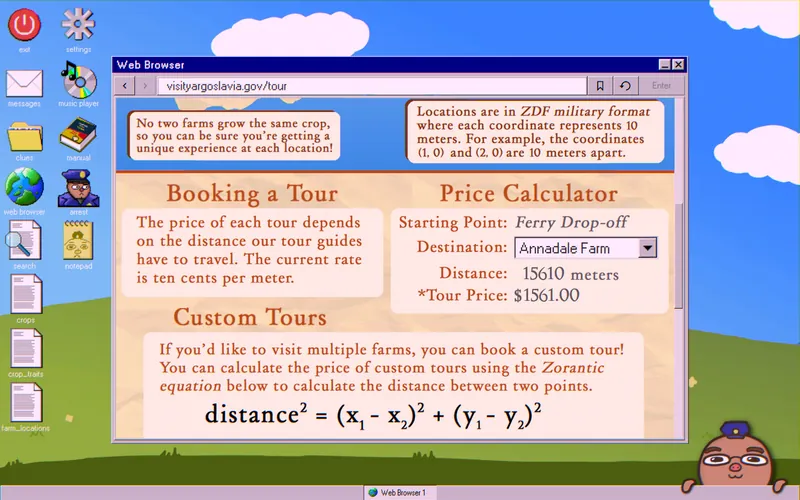
The Book a food tour here! section explains how to use the “Zorantic equation” (the Pythagorean Theorem) to find the distance between two points. You’ll need it. Download the farm_locations table, and note that farm locations are scaled by ten. The section also mentions pricing, but it doesn’t seem to matter for the case.
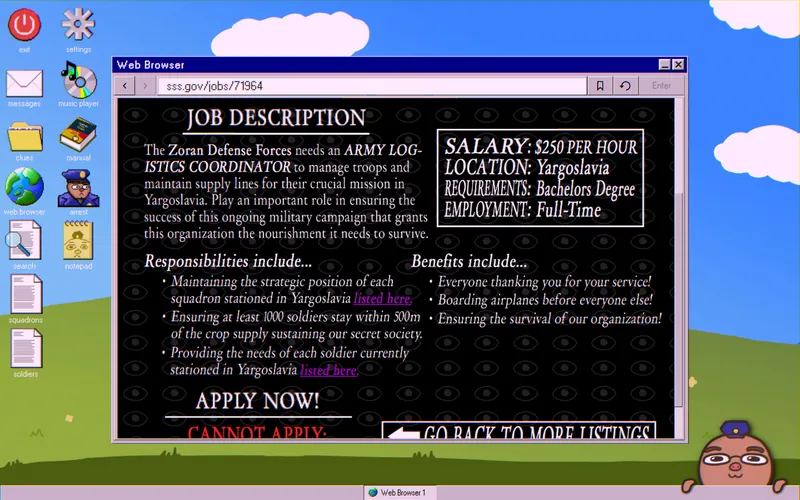
To find out which farm is being used, return to sss.gov/jobs and open the Zoran Defense Forces posting. It says at least 1,000 troops must be kept within 500 meters of the crop that supports the secret society. Download the squadrons and soldiers tables.
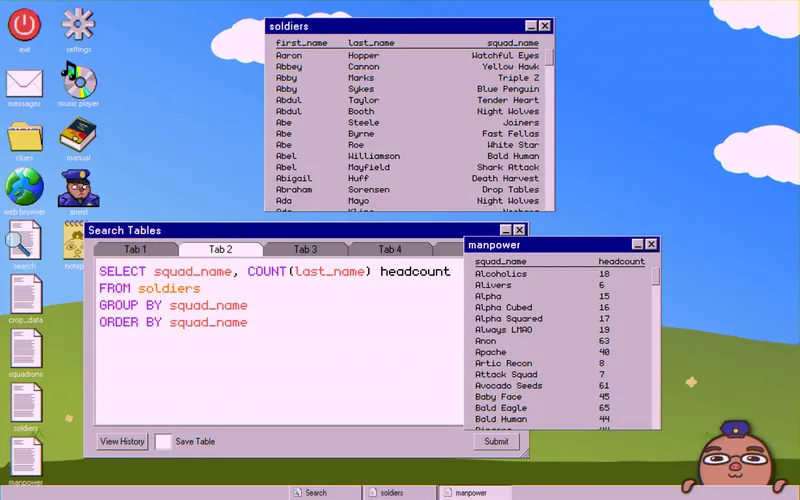
Count the soldiers in each squad:
SELECT squad_name, COUNT(last_name) headcount
FROM soldiers
GROUP BY squad_name
ORDER BY squad_name
Save it as manpower.
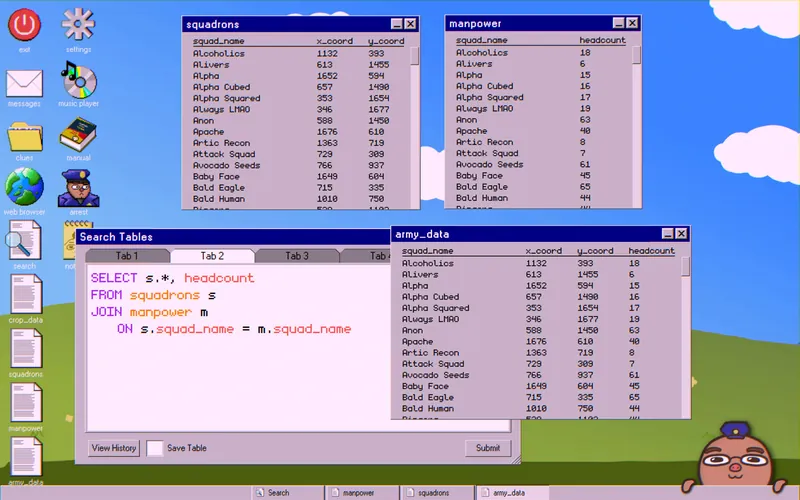
Join it with the squadrons table to make the data easier to read:
SELECT s.*, headcount
FROM squadrons s
JOIN manpower m
   ON s.squad_name = m.squad_name
Save it as army_data.
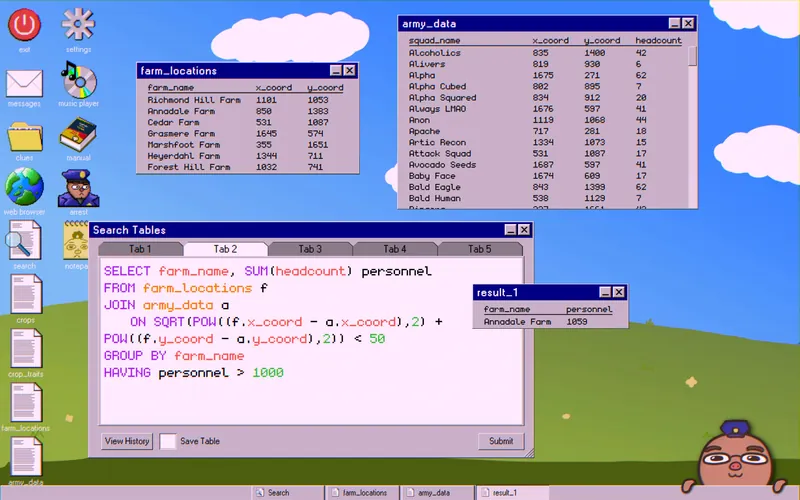
Combine it with farm_locations to find the farm growing the crop:
SELECT farm_name, SUM(headcount) personnel
FROM farm_locations f
JOIN army_data a
   ON SQRT(POW((f.x_coord - a.x_coord),2) + POW((f.y_coord - a.y_coord),2)) < 50
GROUP BY farm_name
HAVING personnel > 1000
Only one farm_name should appear. In the example run, it was “Annadale Farms.”
Publishing the Truth
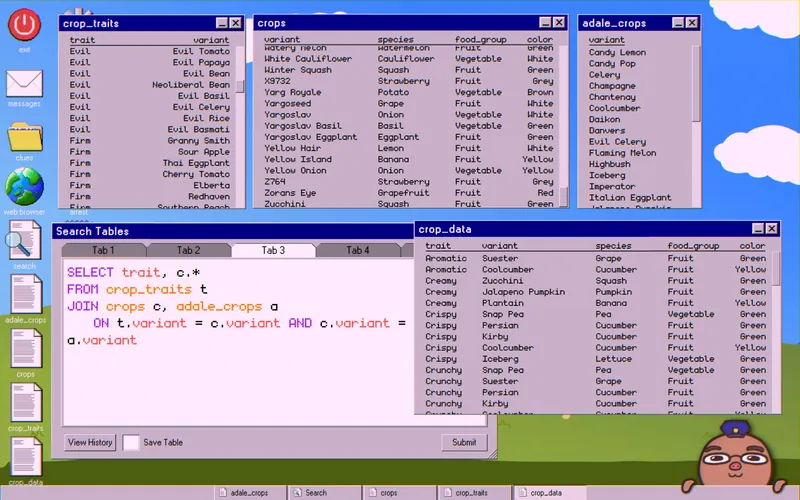
Download that farm’s crop table and join it with crops and crop_traits:
SELECT trait, c.*
FROM crop_traits t
JOIN crops c, adale_crops a
   ON t.variant = c.variant AND c.variant = a.variant
Save it as crop_data. The table lists the traits of each crop, but only one is the main crop feeding the secret society. Use it to rule out the remaining animals until one is left.
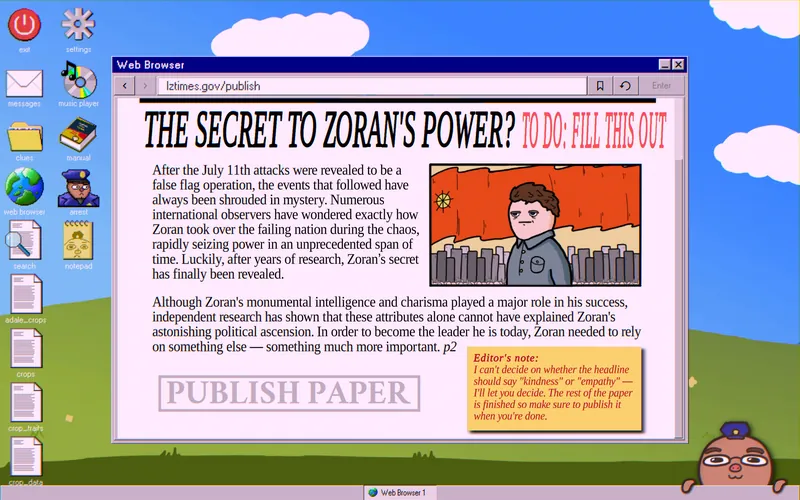
Once you know the animal, go to lztimes.gov/publish and publish the truth. If you got it right, a cutscene plays. You’ve wiped out all crime and are now out of a job.
- Status Quo Enjoyer: an editor’s note in the corner of the page asks you to use the word “kindness” or “empathy.” Do it and publish to unlock this achievement.
- Busted: publish the wrong animal. Your supervisor gets arrested and this achievement unlocks.
Credit: @MyAltAleks