Edit one game file to stop gasoline trucks from leaving oil spills on the road in Car Park Capital.
Car Park Capital: Turn Off Gasoline Truck Oil Spills
A gasoline truck carrying more than a few units of gasoline has a 25% chance to drop an oil puddle every 2.5 seconds. You can switch this off by editing one game file. It takes about 5 minutes and needs no modding experience.
Note: This is an unofficial tweak. A game update may undo it, and verifying your game files will restore the original file.
Find the file
- Right-click Car Park Capital in your Steam library.
- Select Manage > Browse local files.
- Open this folder:
assets\scripts\entities\simulation\vehicles- Locate GasolineTruck.lua.
Back it up before editing. Copy the file and give the copy a name such as GasolineTruck.lua.backup.
Delete the spill code
- Open GasolineTruck.lua in a text editor. Notepad is enough, though Notepad++ or VS Code make the code easier to read.
- Scroll to the bottom of the file.
- Delete the block marked with a red outline in the screenshot below. It begins with
setUpdateFunctionand finishes withend).
[IMAGE 1: End of GasolineTruck.lua with the oil spill code block outlined in red]
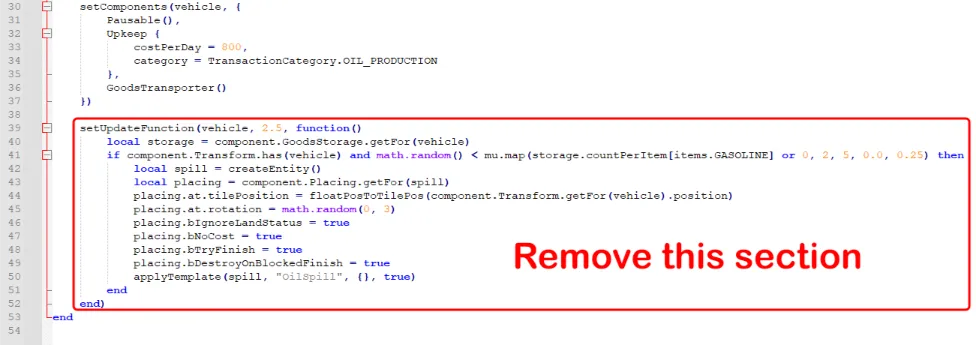
Important: Keep the final end of the file, just below the outlined block. It closes the truck’s create function, and the game will not work without it.
Once the block is gone, the file should end like this:
GoodsTransporter()
 })
end- Save the file.
- Restart the game if it is running.
What changes
Gasoline trucks stop leaving oil on the road. Any puddles already on the map clear by themselves within 10 minutes.
Credit: @Nikku